Professional Call Center Setup Guide

Professional Call Center Setup Guide

Setting up a professional call center is a fundamental step for any company aiming to enhance customer experience and boost sales. Whether you are a startup or a large enterprise, having an integrated contact center system helps you to:

  • Improve customer service quality and increase customer satisfaction.
  • Reduce wait times and better organize calls.
  • Accurately monitor employee performance.
  • Increase sales opportunities through effective customer follow-up.
  • Reduce operational costs.

In this guide, we’ll explain everything you need to know to get started with building a professional call center, including how to set up a professional call center and the key components involved, from infrastructure to choosing the best technical solutions.

1. Infrastructure

Infrastructure forms the foundation upon which any successful call center is built. To ensure call quality that reflects your brand, the following must be provided:

  • Fast and stable internet: It is recommended to rely on high-speed fiber connections, with a backup line (failover) to ensure service continuity.
  • Local Area Network (LAN): Use modern switches (PoE + 1G) and Cat6 cables along with professional-grade routers to ensure stable performance.
  • Servers: Whether on-premises or cloud-based to run the call center system efficiently.
  • QoS technology: Prioritize voice packets to prevent call lag or interruptions.
  • Security and protection: Use firewalls and call encryption to safeguard customer data.

💡 Tip: Cloud solutions have become the best choice, as they offer high flexibility and lower operational costs.

setting up professional call center

2. Hardware and Communication Equipment

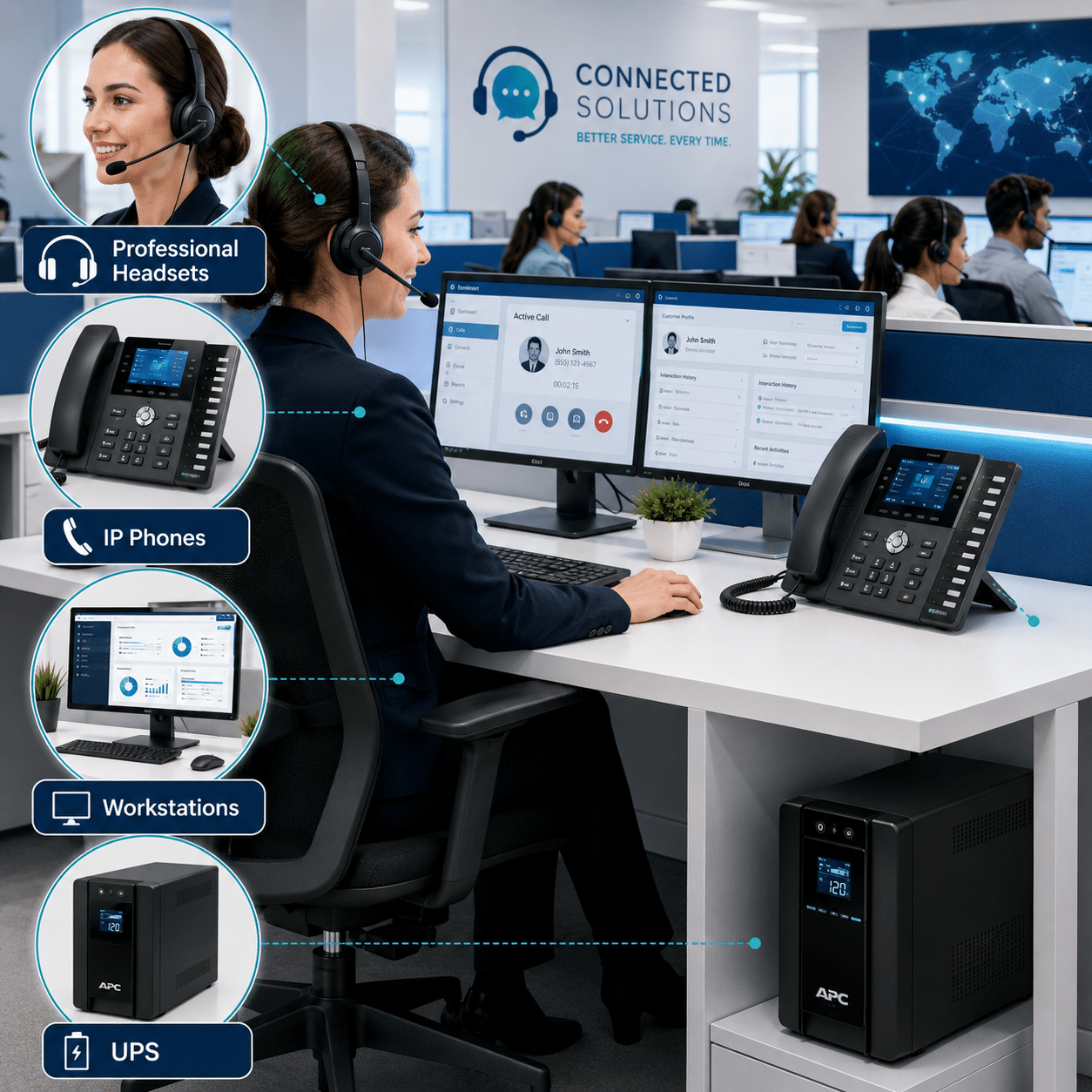
When setting up a professional call center, it is important to choose equipment that ensures employee comfort and productivity:

  • Professional Headsets: Should feature noise-canceling technology to ensure employee focus and clear client audio.
  • IP Phones: Devices supporting high-definition voice (HD Voice) and multiple lines (SIP accounts).
  • Workstations: Modern computers with at least 8GB RAM to ensure smooth navigation between call software and CRM systems.
  • Uninterruptible Power Supplies (UPS): To keep critical equipment running during unexpected power outages.

3. Software: The Brain Behind the Call Center

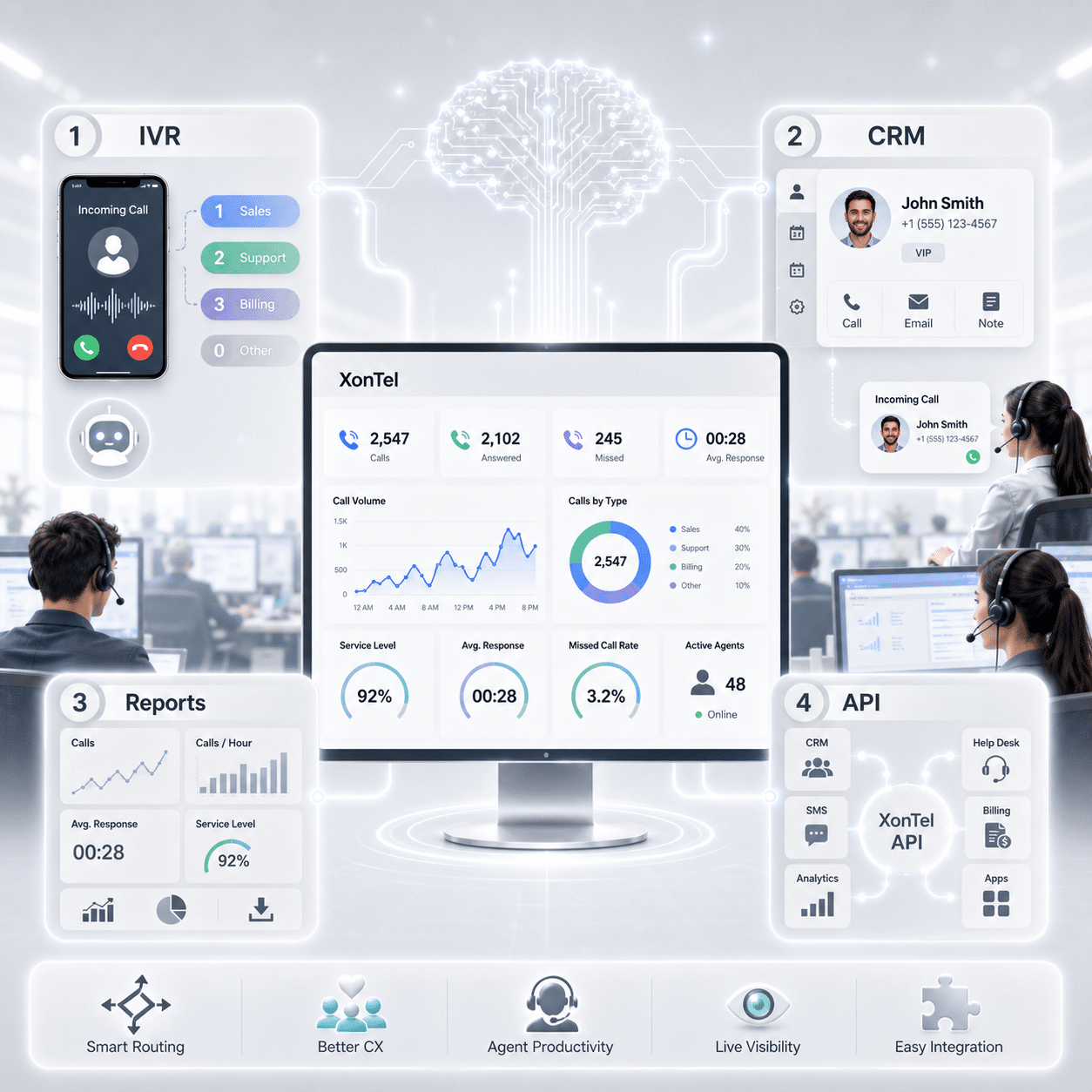
Choosing an intelligent system like XonTel Call Center makes all the difference. When selecting software, make sure it includes the following features:

  • Intelligent IVR (Interactive Voice Response): Automatically guide clients through innovative voice menus to reduce employee workload.
  • Deep CRM Integration: Connect the system with customer relationship management software to display caller data and history instantly (screen pop-up).
  • Real-time Dashboard and Reports: Live monitoring of call volumes, response times, and missed call rates.
  • API Integration: Connect the call center with any other internal systems your company uses.
XonTel call center

When to Choose a Cloud Solution Instead of a Traditional One:

Choose a Cloud Call Center if you are looking for:

  1. Fast Deployment:Get up and running within hours, not weeks.
  2. Cost Savings: No need to purchase expensive servers or hire a permanent maintenance team.
  3. Remote Work: Manage your team and agents from anywhere in the world.
  4. Easy Scalability: Add new lines and employees with just a click.
Cloud Call Center

Why Choose XonTel to Implement Your Call Center System?

At XonTel, we don’t just sell you hardware; we design a smart communications system that grows with your business.
Our extensive experience has made us the region’s leading provider of:

  • Ready-to-Use Cloud Call Center System: Get started immediately.
  • Professional Management of Inbound & Outbound Calls: Efficiently handle all customer interactions.
  • Omnichannel Support: Integrate WhatsApp, chat, and calls into a single platform.
  • Specialized Technical Support: Deep expertise in customizing solutions to fit your specific needs.


🚀 Start your journey to customer service excellence now! If you’re looking to build a professional call center that combines simplicity and power, XonTel provides everything you need in one place.

Contact XonTel experts now and get a free consultation.

Frequently Asked Questions (FAQ)

What are the basic steps to setting up a professional call center?

Setting up a professional call center starts with determining the number of employees, expected call volume, the nature of incoming and outgoing calls, and the channels customers will use.
After that, you should set up a stable internet connection, a suitable internal network, and employee devices, then choose a call center system that offers auto-attendant, waiting queues, call recording, reporting, and CRM integration.

What are the basic components for building a professional call center?

The basic components include a fast, stable internet connection, an internal network that supports quality of service, computers, professional headsets, and IP phones when needed.
A call center also needs software to manage incoming and outgoing calls, auto-attendant, waiting queues, call recording, employee monitoring, and reporting.

How much does it cost to set up a professional call center?

The cost of setting up a professional call center varies depending on the number of employees, the type of system used, the number of lines, the required equipment, and additional features such as recording, reporting, and CRM integration.
The upfront cost of cloud solutions is typically lower than traditional systems, since they don’t require purchasing internal servers, preparing a server room, or hiring a permanent team to manage and maintain the system.

Can a small business set up a call center?

Yes, small business can set up a call center with a limited number of employees, then gradually scale up as the business grows.
Cloud call center solutions help small companies use professional features like auto-attendant, call recording, waiting queues, and reporting, without needing a large investment in servers and infrastructure.

What are Xontel's cloud call center solutions?

Xontel’s cloud call center solutions are systems that help companies manage incoming and outgoing calls through a centralized platform without needing to host servers within the company’s premises.
The solutions include features such as auto-attendant, waiting queues, call recording, reporting, employee monitoring, remote work, and integration with CRM systems and various digital channels.

What are the key features of the Xontel Call Center system?

Xontel Call Center provides tools for managing incoming and outgoing calls, setting up auto-attendant, creating waiting queues, recording calls, and tracking missed calls.
It also provides dashboards and reports that help management track wait times, employee performance, call volume, answer rate, and other important performance indicators.

Why do companies choose Xontel to implement their call center system?

Xontel offers customizable solutions based on the company’s size and the nature of its customer service operations, whether calls are incoming, outgoing, or handled across multiple channels.
The company also helps design call scenarios, set up the system, link it with other systems, train employees, and provide technical support after launch.

When do companies prefer switching to Xontel's cloud call center solutions compared to traditional systems?

Xontel’s cloud call center solutions become the ideal and necessary choice when a company seeks:

  • Fast implementation: getting the center up and running within a few hours, without needing to wait weeks for server setup.
  • Cost savings: eliminating the hefty capital expenses of buying servers and cooling rooms or hiring permanent maintenance teams.
  • Flexibility and remote work support: the ability to manage the team and monitor calls from anywhere in the world, with the ease of adding new employees at the push of a button.

call2action-En

For more information about XonTel products and services, leave your data and one of our specialists will contact you