Unified Number for Companies

Posted on: November 18th, 2025 by xontel_admin

Communicating with customers via phone is vital and important, as a company’s phone number plays a crucial role in enhancing interaction with its customers, whether it is a small business or a large organisation. Therefore, having a unified Number for your company is a necessity for many reasons.
Despite the development of communication methods and digital platforms, some statistics show that more than 50% of customers still prefer to communicate with companies via traditional telephone lines.

In this post, we explain a detailed overview of the definition of a unified number for companies and its importance.

What is the company's unified number?

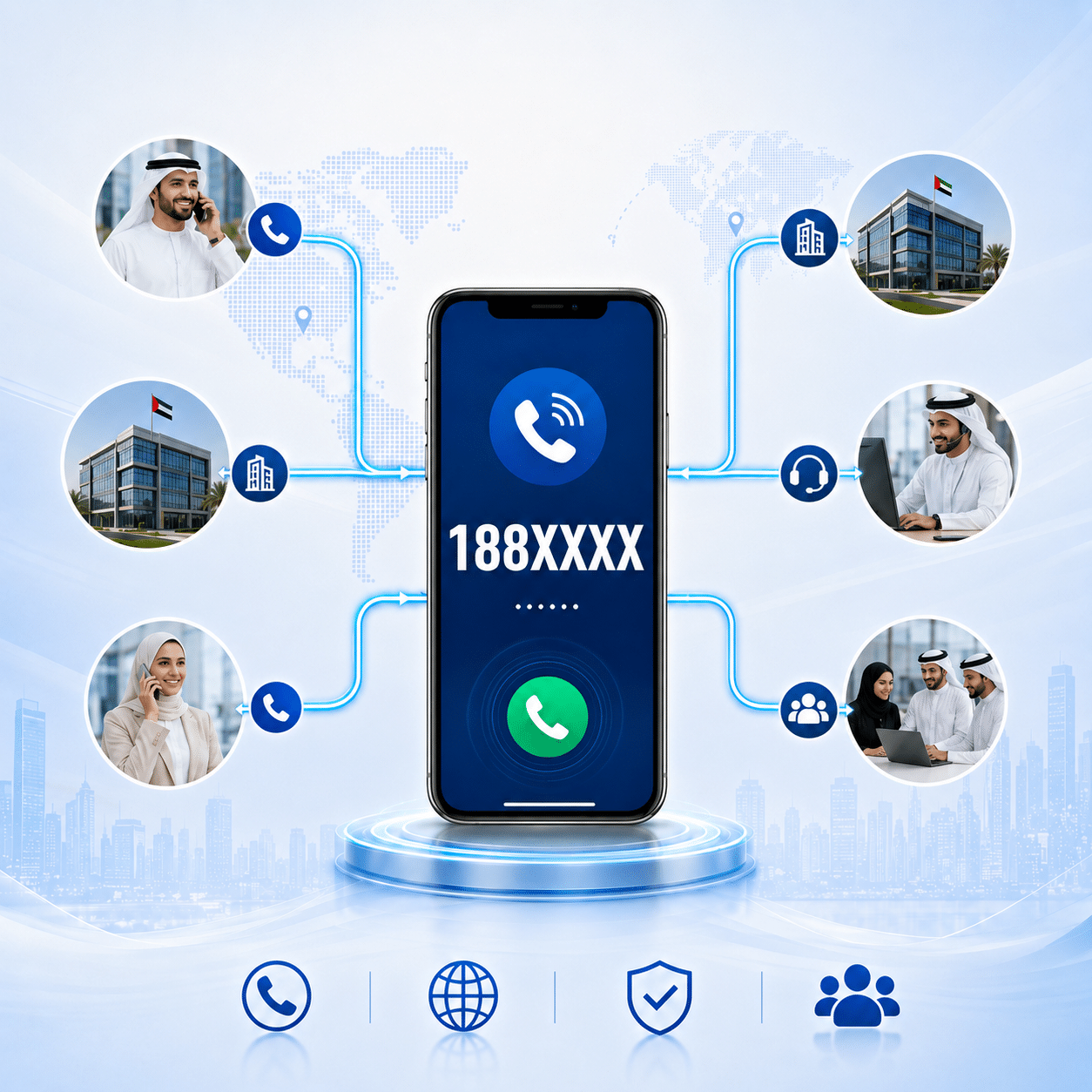
The unified number is a single phone number that connects all company’s branches and departments, and serves as the primary contact point for customers and clients who want to communicate with the company.
This number provides an easy and quick way to reach the different departments without any complications, which enhances the user experience, increases customer satisfaction, and helps companies deliver their services more efficiently.

Through the unified Number, companies can build a strong professional image and enhance customer loyalty, which leads to increased sales and the continuity of the relationship with customers.
What is the unified number

Examples of unified numbers in some countries

  • In Saudi Arabia: The unified number consists of 9 digits and starts with 9200.
  • In Kuwait: The unified number consists of 7 digits and starts with 188.

The number should be easy to remember and unique, and all customers should be able to call it from anywhere in the world.
This number can also be linked to the company’s main switchboard, enabling all branches worldwide to be connected so that customer’s call is directed to the appropriate branch or the relevant employee to provide the required service.

Why is the Unified Number for Companies important?

The importance of a company’s unified number cannot be overstated, as it is a key communication tool that contributes significantly to the company’s success and its public image. The following are the most important reasons that highlight the importance of having a unified number:

1. Professional image of the company

The unified number gives the company a professional image and provides customers with a sense of stability, credibility, and continuity, which enhances trust in the company and its reliability.

2. Strengthening the brand identity

The unified number contributes to reinforcing the brand identity, as it becomes an integral part of it and it is easy for customers to remember and recognise. The distinctive and simple number enhances brand recall and strengthens the connection between the company and its target audience.

3. Ease of communication with customers

The unified number ensures that customers can easily and quickly communicate with the company, which is crucial for enquiries, technical support and customer service. Companies that make it easy for their customers to reach them are more capable of retaining their existing customers and attracting new ones.

4. Marketing and advertising effectiveness

Unified numbers play an important role in marketing and advertising campaigns, whether on websites, social media, or printed advertisements, as the distinctive number serves as an  attractive tool that facilitates communication between potential customers and the company.

Unified Number for Companies
5. Flexible and diverse communication

The unified number can be used on other channels such as social media apps (e.g. WhatsApp) to facilitate and simplify communication with customers through means beyond just phone calls.

How to obtain a unified number for the company?

1. Choose a service provider:

Look for a reliable telecommunications provider that offers unified number services for companies, taking into account factors such as pricing, features, and previous customer experiences.

2. Determine the type of number:

Choose the type of number that best suits your business needs, noting that some countries allocate specific numbers for certain sectors.

3. Activate features and services:

Operating the unified number through the company’s PBX allows you to add services such as call forwarding, voicemail, call queues, and conference calls.

4. Promote the unified number:

Share your company’s unified number across all channels: website, social media, business cards, and marketing items, to make it easy for customers to reach it.

In conclusion
The unified number is a strategic tool that enhances the efficiency of communication between a company and its customers, helping to build long-term relationships with them. By choosing the appropriate number and services, companies can achieve a professional communication experience that leaves a positive and lasting impression on customers.

Frequently Asked Questions (FAQ)

What is a unified number for companies and how does it work in customer service?

A unified number for companies, also known as a unified business number is a single phone number that connects all of a company’s branches and departments, serving as the main contact point for customers. This number gives customers quick, easy access to the relevant department without complication, as it’s linked to the main PBX to route calls in a way that boosts customer satisfaction and supports operational efficiency.

Can the unified number be linked to all of a company's branches?

Yes, the unified number can be linked to all of a company’s branches, so that calls are routed to the appropriate branch based on the customer’s selection, location, business hours, or call distribution rules set by the company.

Can the unified number be linked to a cloud PBX?

Yes, the unified number can be linked to a cloud PBX to manage calls through a centralized platform, taking advantage of features such as auto-attendant, call forwarding, waiting queues, call recording, and detailed reports.

Can calls to the unified number be received from outside the office?

Yes, once the unified number is linked to the cloud PBX, employees can receive calls from the office, branches, or while working remotely, using a desk phone or an app on a mobile phone or computer.

What are the key benefits of having a unified number for a business?

The unified number is an important strategic tool for any company, offering benefits including:

  • Professional image: gives the company high credibility and a sense of stability among customers.
  • Strengthening brand identity: the number becomes an integral part of the company’s identity and is easy for the public to remember.
  • Marketing effectiveness: it’s an attractive, impactful element in ad campaigns, social media, and print materials.
  • Flexible communication: the ability to link it to other channels like customer messaging apps (such as WhatsApp) to expand support.

Do the formats and shapes of unified numbers differ by country?

Yes, unified number formats differ according to the systems and regulations adopted in each country. For example, in Saudi Arabia, the unified number consists of 9 digits starting with the prefix (9200), while in Kuwait it consists of 7 digits starting with (188). The number is always designed to be easy to remember and not duplicated, to make it easy to dial from inside or outside the country.

What steps are involved in obtaining and activating a unified number for a company?

Getting a unified business number involves several key steps:

  1. Choosing a service provider: looking for a reliable telecom provider offering the service at the best prices and features.
  2. Determining the number type: choosing the number suited to the nature and activity of the establishment.
  3. Activating features and services: linking the number to the company’s internal PBX to activate advanced features like call forwarding, waiting queues, and voicemail.
  4. Promoting the number: publishing the unified number across all the company’s digital channels and printed materials to ensure customers can easily reach it.

Does changing the company's location or moving to another city affect the establishment's unified number?

One of the key advantages of a unified number is its complete flexibility; it’s a virtual number not tied to a geographic location or a traditional landline exchange for a specific area. So, a company can move to any new location or open multiple branches in different cities while keeping the same unified number unchanged, as calls are rerouted programmatically to the new destination with complete ease.
call2action-En

For more information about XonTel products and services, leave your data and one of our specialists will contact you

The Difference Between On-Premises and Cloud-Based PBX systems

Posted on: August 26th, 2025 by xontel_admin
On-Premises vs Cloud PBX

In today’s business world, companies face the ongoing challenge of balancing the need to stay up to date with modern communication technologies while managing costs and maintaining the infrastructure required to support operations. Striking the right balance is no easy task — especially when making decisions that affect all of these areas.

One such critical decision is: Should your company move its communication system to the cloud, or keep it on-premises?

To help you make the right decision for your business, we’ve outlined six key differences between on-premises communication systems and cloud-based solutions.

Understanding On-Premises and Cloud-Based PBX Phone Systems

Before diving into the differences, let’s make sure we understand the basics. The core distinction between the two lies in where the system is hosted.

On-Premises IP-PBX System:

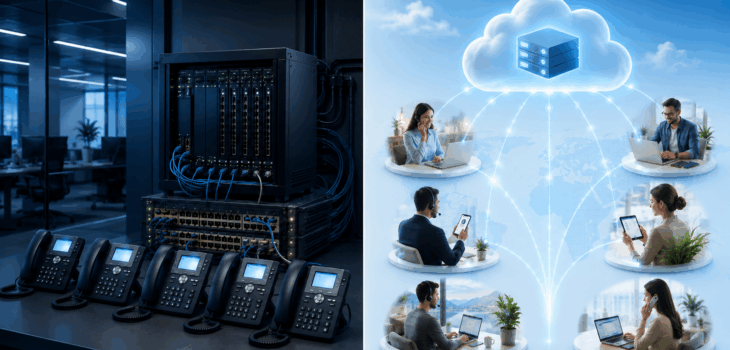
As the name implies, on-premises systems are hosted physically within your company. Communication equipment and PBX servers are installed and maintained on-site, giving your business full control over the infrastructure, call routing, and security protocols.

On-Premises IP-PBX

Key Advantages:

  • Full Control: On-premises systems give your company complete control over system settings, call management, and security policies.
  • Enhanced Security: Calls stay within the company’s internal network, offering greater protection against external threats — especially critical for businesses handling sensitive data.
  • Not Dependent on Internet: Internal communication does not rely on an internet connection, allowing the system to function even during internet outages.
  • Long-Term Cost Efficiency: After the initial hardware investment, monthly operating costs are typically lower, making it a cost-effective choice in the long run.

When to Choose On-Premises:

  • Companies with a dedicated IT team capable of managing and maintaining the infrastructure.
  • Businesses with high-security requirements that prefer to keep all data in-house.
  • Organizations with a budget for upfront hardware investment prefer to avoid ongoing monthly fees.

Cloud-Based IP-PBX System:

Also known as Hosted PBX, this model is fully managed by an external service provider. All you need is a stable internet connection and IP phones or softphone applications on computers and mobile devices. Services are billed through monthly or annual subscriptions.

Key Advantages:

  • High Flexibility: Easily scale up or down by adding or removing users and lines as needed — without additional hardware.
  • Low Upfront Costs: No major initial investment is required. You only pay for what you use, making it an ideal option for small and medium-sized businesses.
  • Simple Maintenance & Management: The service provider handles all updates, maintenance, and technical support, easing the load on your internal IT team.
  • Remote Work Ready: Employees can access the system from anywhere, enabling seamless remote work and integration across multiple locations.

When to Choose Cloud-Based:

  • Small to medium-sized businesses with limited budgets or no in-house IT teams.
  • Companies with remote teams or multiple office locations.
  • Businesses are looking for fast, scalable solutions that adapt to their growth.
Cloud-Based IP-PBX

Ultimately, choosing the right system depends on the company’s size, budget, security requirements, and internal work structure.

If you’re seeking complete control and absolute security while having the capacity for initial costs, then an On-Premises system is the most suitable choice. However, if you’re looking for flexibility, speed, and lower initial costs, then a Cloud-Based system is the optimal solution.

To help you make this decision, XonTel offers comprehensive solutions for both options:

  • On-Premise PBX Systems: XonTel provides all the necessary solutions, services, and equipment to establish and operate a fully local communication system within the company premises, giving you absolute control and high security for your data.
  • Cloud-Based IP-PBX Systems: Through its sister company Telsip, Telsip provides all cloud PBX solutions, enabling companies to benefit from flexibility, easy scalability, reduced initial costs, and remote work support.

In this way, XonTel ensures that every company, regardless of its size or needs, will find the optimal solution that aligns with its business model and future aspirations.

Frequently Asked Questions (FAQ)

What is the difference between on-premise communication systems and cloud communication systems?

On-premise communication systems operate within a company’s premises through servers and equipment it owns, while cloud communication systems are hosted by an external service provider and accessed over the internet. This difference affects cost, maintenance, control, and ease of scaling.

Which is less costly: an on-premise system or a cloud system?

On-premise communication systems typically require a higher upfront cost for purchasing equipment, servers, licenses, and setting up the network. Cloud communication systems, on the other hand, generally have a lower initial cost, but rely on a monthly or annual subscription depending on the number of users and services.

Which gives the company greater control?

On-premise communication systems provide direct control over servers, settings, data, and operating policies. In cloud systems, the company manages features and users through a control panel, while the core infrastructure remains under the service provider’s management.

Which is more secure: on-premise or cloud communication systems?

Security doesn’t depend solely on where the system is hosted, but on encryption, security updates, password management, firewalls, user permissions, backups, and monitoring. Both systems can be secured well when implemented and managed correctly.

Which system is better for small and medium-sized businesses?

Cloud communication systems are generally suitable for small and medium-sized businesses due to their lower upfront cost and ease of deployment and scaling. However, some companies may choose an on-premise system if they have specific requirements or already have infrastructure and a technical team in place.

Which is easier to maintain and manage?

The company’s own team or maintenance provider manages an on-premise system, updating its hardware and software and fixing issues. In a cloud system, the service provider handles the infrastructure and core updates, reducing the burden on the IT team.

What is a Hybrid PBX system?

A hybrid system combines some on-premise communication components with cloud services. It can be used to keep local systems or lines while taking advantage of cloud features such as branch connectivity, remote work, or backup.

How does Xontel and its cloud platform "Telsip" help companies choose the right communications system?

The Xontel group offers integrated solutions that meet all needs regardless of company size or business model:

  • On-premise PBX systems: Xontel provides the equipment and services needed to build a fully local infrastructure within the company’s premises for those seeking absolute security and complete control.
  • Cloud-based communication systems: through its cloud platform Telsip, Xontel offers modern cloud communication solutions that give companies flexibility, easy scalability, and reduced operating costs.

call2action-En

For more information about XonTel products and services, leave your data and one of our specialists will contact you

XonTel Enters the Cloud Communications Arena with the Launch of Telsip

Posted on: August 26th, 2025 by xontel_admin

XonTel has long been recognized as a trusted partner in on-premise PBX telecommunication solutions, providing enterprises with the hardware, equipment, and services required to build robust and secure internal communication infrastructures across companies and government institutions.

However, with the growing market demand for more flexible systems that can easily scale up or down — while also reducing operational costs through cloud-based solutions — XonTel realized the importance of delivering a comprehensive ecosystem that combines its legacy expertise in traditional systems with cutting-edge innovation in cloud communications.

In a strategic move that reinforces its leadership across the Gulf and Arab markets, XonTel proudly announces the launch of its new cloud platform:  Telsip.com— the cloud arm of the company and its gateway to next-generation communication and cloud call center solutions.

What Does Telsip Offer?

Telsip is focused on delivering advanced cloud-based communication solutions that allow XonTel to maintain its excellence in on-premise systems while ensuring top-tier quality and innovation in the cloud space.

telsip
  • 1. Advanced Cloud PBX System

    A virtual solution for managing calls over the internet, tailored for modern businesses. Features include:

    • Full support for SIP Trunking and Interactive Voice Response (IVR) systems
    • Smart call routing with a Virtual Receptionist
    • Virtual Fax
    • Call Recording
    • Voicemail to Email functionality
    • Complete support for inbound and outbound calls

    And many other modern telecommunication features — explore more here

telsip Cloud Call Center
  • 2. Fully Integrated Cloud Call Center

    A comprehensive solution for managing customer experience across multiple channels, offering:

    • Full support for agents and supervisors
    • Customer Relationship Management (CRM) system
    • Automatic Call Distributor (ACD)
    • Smart Ticketing System for issue tracking and resolution
    • Integration with email, SMS, and web chat
    • Detailed reports and in-depth performance analytics
    • Integration with social media platforms

    And many more powerful features — learn more here

A Strategic Step Toward the Future

With the launch of Telsip.com, XonTel evolves from being solely a provider of on-premise solutions to a comprehensive telecom partner that supports both local and cloud-based communication systems. This transformation strengthens the company’s position as a forward-thinking innovator, empowering clients with the freedom to choose the communication model that best fits their business needs.

Frequently Asked Questions (FAQ)

What is the Telsip platform?

Telsip is a platform specialized in providing cloud communication solutions for businesses, including a Cloud PBX system and a Cloud Call Center. The platform helps companies manage calls and customer service through flexible systems that run over the internet.

What is the relationship between Xontel and Telsip?

Telsip is Xontel’s cloud arm, launched to expand the company’s solutions from traditional on-premise systems to modern cloud platforms. This allows Xontel to offer both local and cloud communication solutions to suit the varying needs of businesses.

What is meant by cloud communications?

Cloud communications are communication services that operate over the internet instead of fully relying on equipment and servers installed inside a company’s premises. These services include call management, cloud PBX, contact centers, call recording, reporting, and integration with various communication channels.

What services does the Telsip platform offer?

The Telsip platform offers a range of cloud communication solutions, most notably Cloud PBX for managing company calls, and a cloud contact center for managing customer service, agents, and supervisors. It also provides features such as IVR, call recording, ticketing, reporting, and integration with email, messaging, and chat.

What is Telsip's Cloud PBX system?

Telsip’s Cloud PBX is a virtual PBX that runs over the internet, allowing companies to manage incoming and outgoing calls without needing to run a traditional PBX on-site. It offers features such as call forwarding, auto-attendant, call recording, voicemail, and e-fax.

What are the key features of Telsip's cloud PBX?

Cloud PBX features include SIP Trunk support, Interactive Voice Response (IVR), call routing, a virtual receptionist, call recording, voicemail-to-email, and managing outgoing and incoming calls from a centralized platform.

What is a Cloud Call Center?

A cloud call center is a system for managing customer communication, calls, and agents through a cloud-based platform. It helps companies organize call distribution, monitor employee performance, manage customer requests, and access reports from anywhere.

What features does Telsip's cloud call center offer?

Telsip’s cloud call center offers agent and supervisor management, an Automatic Call Distributor (ACD), a ticketing system, reports and analytics, and customer data management. It also supports integration with email, SMS, chat, and social media.

call2action-En

For more information about XonTel products and services, leave your data and one of our specialists will contact you

The role of Artificial Intelligence (AI) in enhancing cybersecurity

Posted on: June 9th, 2024 by xontel_admin

Cybersecurity continues to be crucial with the evolution of technology and its increasing use in various aspects of both business and people’s lives.

As our reliance on digital technology increases, cybersecurity threats are increasing and becoming more complex. Therefore, the field of cybersecurity is constantly evolving to face these new threats and challenges.

What are the most recent trends in cybersecurity?

  1. Using artificial intelligence and machine learning technologies to detect and respond to cyber threats quickly and accurately.
  2. Safeguarding personal data and ensuring privacy through the development of digital identity to protect accounts and personal information from hacking.
  3. Protecting cloud-stored data, where companies provide security measures including data encryption and secure access to this data.
  4. Developing cybersecurity solutions tailored for devices that connect to the internet and exchange data with each other, known as Internet of Things (IoT) cybersecurity.

The use of Artificial Intelligence (AI) in cybersecurity

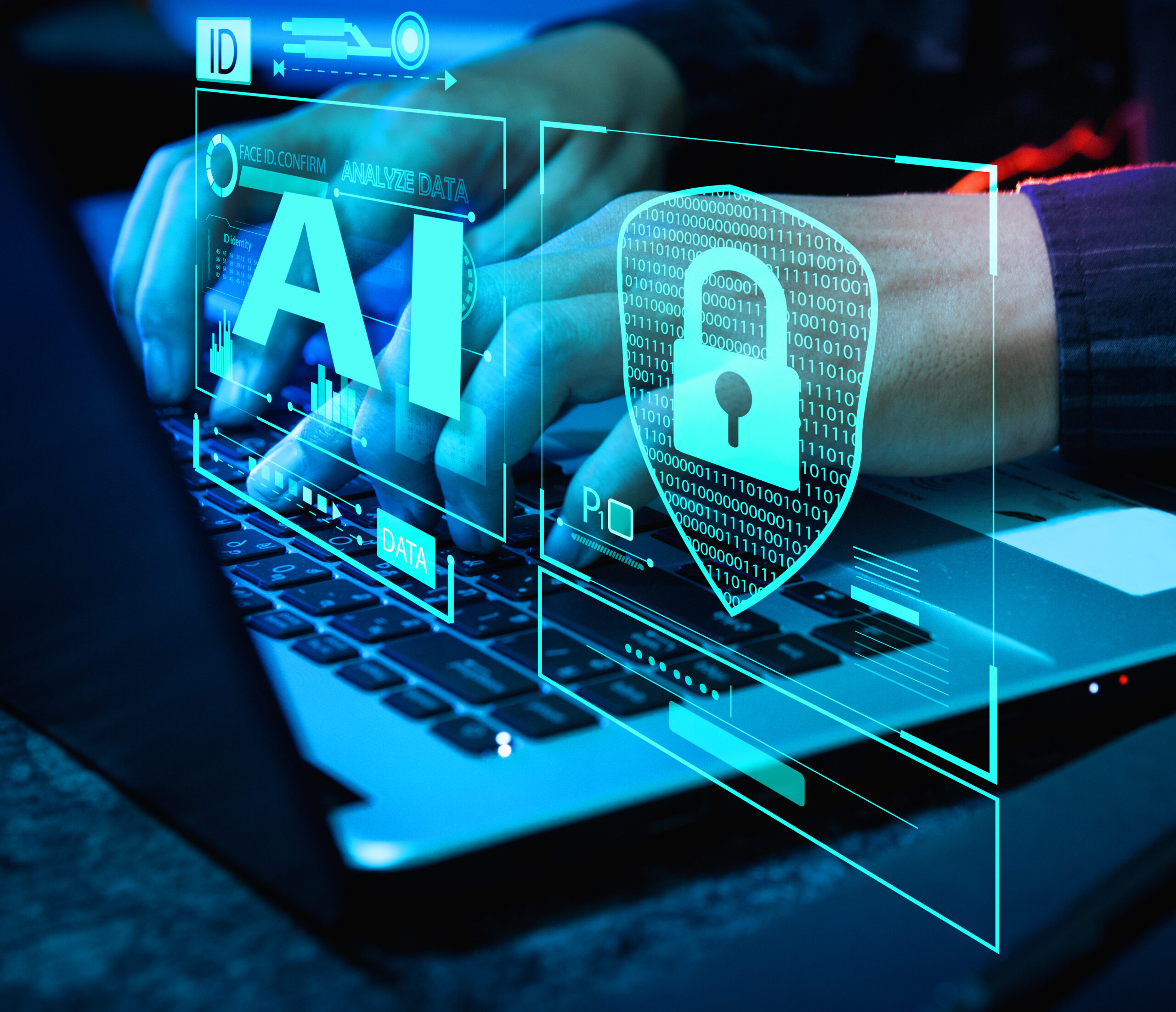
The use of Artificial Intelligence (AI) is one of the most important improvements in cybersecurity, as it offers innovative solutions to enhance the cybersecurity of both individuals and organisations.
AI is a powerful and effective tool for protecting systems and networks from cyber attacks and security threats. It is used in the following situations:

1. Threat detection:

Artificial Intelligence can analyse huge amounts of data quickly and efficiently, allowing it to detect emerging threats and malware. It also analyses unusual patterns that may indicate a potential cyberattack.

2. Addressing threats:

AI can take proactive actions to defend against threats, such as blocking malicious software or isolating infected systems, which minimises damage and ensures cybersecurity.

3. Forecasting threats:

Artificial Intelligence can analyse past data and current patterns to predict future threats, allowing preventive actions to be taken in the most suitable way for the anticipated threats.

4. Adjusting to advanced threats:

Always develops advanced defence strategies to face the progressive evolution of future cyber attacks.

5. Behaviour analysis:

Used to monitor user behaviour and understand normal behaviour patterns in order to detect abnormal behaviour that may indicate malicious cyber activity.

6. Analysis of weaknesses and risk assessment:

Artificial Intelligence helps accurately analyse vulnerabilities in systems and networks, provides a comprehensive assessment of security risks, automatically fixes vulnerabilities, or provides recommendations for repair and cybersecurity.

7. Identity verification:

Improves the accuracy of identity verification by using technologies such as facial recognition, voice recognition, and more effective detection of identity theft attempts.

8. Data protection:

Detect data theft attempts and hacks, encrypt sensitive data, and secure it from unauthorised access.

9. Preventing phishing:

Analysing emails and websites to detect fraud and phishing attempts.

10. Cybersecurity for the Internet:

Protecting the Internet infrastructure from large-scale cyber attacks to ensure the security of data and information on the Internet.

Advantages of using Artificial Intelligence (AI) in cybersecurity

  • Speed and efficiency: AI can process and analyse data faster than humans.
  • High accuracy: AI is able to learn from huge amounts of data to detect threats with high accuracy.
  • Continuous adaptation: AI is able to learn and adapt to new threats on an ongoing basis.
  • Cost reduction: AI can perform many security functions, which reduces costs.

XonTel provides the latest technologies that compete with their global counterparts, ensuring cyber security and helping to secure networks from any cyber attacks. It offers the best devices with significant protection features.

For more Products and Services from Xontel click here

Frequently Asked Questions (FAQ)

What role does AI play in cybersecurity?

AI helps analyze large volumes of security data, detect unusual patterns, identify potential threats, and prioritize alerts by severity. It can also be used to speed up incident response and support cybersecurity teams in making more accurate decisions.

How does AI detect cyberattacks?

AI analyzes network traffic, system logs, user behavior, files, and emails to look for abnormal indicators. When it detects activity that deviates from usual patterns, the system can issue an alert or initiate a security action according to defined policies.

How does AI help respond to threats?

AI-powered security systems can carry out automated actions, such as blocking a suspicious address, isolating an infected device, temporarily suspending an account, or preventing a malicious file from running. These actions help reduce response time and limit the spread of an attack, though human oversight remains necessary in sensitive cases.

Can AI predict cyberattacks?

AI can analyze past incidents, threat indicators, and current patterns to identify potential risks and prioritize them. However, it can’t predict all attacks with complete accuracy — rather, it helps cybersecurity teams prepare early and take better preventive measures.

How is behavioral analysis used in cybersecurity?

The system learns the usual patterns of user and device behavior, such as login times, locations used, and data transfer volume. If unusual behavior appears, such as logging in from an unfamiliar location or downloading a large number of files, the system may flag it as activity requiring verification.

How does AI help combat phishing?

AI analyzes the content of emails, links, attachments, the sender’s address, and the way the message is phrased. This helps detect fake messages and attempts to steal passwords or financial data before they reach the user or before the user interacts with them.

What role does AI play in protecting cloud services?

AI helps monitor the use of cloud accounts and resources, detect insecure configurations, suspicious login attempts, and unauthorized changes. It can also support the protection of cloud data by analyzing risks and issuing early alerts.

How does AI strengthen the security of IoT devices?

It can monitor network-connected devices, learn their normal operating patterns, and then detect unusual connections or behaviors. This helps uncover compromised or at-risk devices, alongside the need to update firmware, change default passwords, and isolate devices on suitable networks.

call2action-En

For more information about XonTel products and services, leave your data and one of our specialists will contact you

Hotel management system

Posted on: June 7th, 2024 by xontel_admin
Hotel-Management-System

In the hospitality and tourism industry, hotel management is not a single concept but several concepts that fall under one umbrella.
The hotel management system revolves around the successful management of every hotel operation to ensure the growth and development of the hotel. This includes managing anything related to the hotel industry, including finance and accounting, customer service, employee management, marketing, supply chain management, etc.

What is a Hotel Management System?

The Hotel Property Management System (PMS) is concerned with managing all the operations that take place in the hotel to provide an exceptional experience for customers by coordinating and tracking reservations through various channels, facilitating front office operations, managing guest check-in/check-out and room assignments, managing room rates, overseeing housekeeping, accounting, and generating reports in a central location to help hotel owners manage and monitor their business and connect their branches.

Benefits of a Hotel Management System:

A guest’s travel journey always begins with choosing a destination, followed immediately by selecting the right hotel. Customers’ interactions in pre-stay shopping and booking, their interactions within the hotel with the hotel and its staff, their experience within the rooms, and their post-stay social media sharing are all part of the guest experience.
Hotel staff face a significant challenge in providing a good experience for guests during their stay. Hotel Property Management Systems (PMS) is expected to help hotel staff and owners provide the understanding that the guests want and desire while also efficiently managing their operations.

A Hotel PMS provides many benefits to the business of hotel owners, including:

Internal Supervision - House Keeping:

This increases the efficiency and speed of room supervision. When a guest checks out, the hotel efficiently manages the response to room service tasks and determines and manages the room maintenance needs to ensure the rooms are clean and in excellent condition.

Facilitating Check-in/Check-out Processes:

The front office staff performs guest check-in and room assignment, as well as enables guest services and completes full data entry of customer personal information into the hotel systems.

More Efficient Room Distribution:

Increase room occupancy through real-time availability management and distribution channel inventory control. The hotel’s direct booking channels can potentially increase sales and reservations.

Helps Save Time:

Good hotel management software significantly reduces the time spent on manual administrative tasks. The software handles most of the work, allowing you to devote time to more critical tasks.

Continuous development and improvement of guest relations:

Enhancing guest satisfaction is remarkably achieved through a simplified check-in and check-out experience. This is just the beginning – any improvement in communication and additional services will also increase guest loyalty. Choosing a good hotel management program equals increased guest and staff retention.

Creating, analyzing, and recording all guest data:

Centralizing and securing guest data improves the quality and accuracy of guest profiles through reports and analysis. Understand customer purchasing patterns to identify more targeted packages and services. Ensure compliance with local and international rules and regulations.

Preventing duplicate reservations and frequent human errors:

Hotel management software systems are programmed to avoid double bookings or human errors. Thanks to task automation, they help prevent mistakes when receptionists enter customer data such as names, passport details, and payment card numbers. This means a better guest experience, more time for staff to focus on their essential work, and more accurate business data and reports.

Integration between accounting systems and hotel management systems:
Hotel Property Management System (PMS)

Linking hotel operations with accounting by leveraging integration processes between systems, payment gateways, and hotel industry applications. Commission calculations. Ensure accuracy and integrity of guest accounts for faster and more accurate invoicing.

XonTel provides the latest technologies that compete with global counterparts at competitive prices. It also offers a highly efficient and professional support team to understand and meet the needs of all its customers accurately and efficiently, making it the best choice.

For more information, contact us now. Click here.

Frequently Asked Questions (FAQ)

What is a Hotel Property Management System (PMS)?

A Hotel PMS is a central software program that helps hotels and tourism establishments manage reservations, guest check-in and check-out, room assignment, front desk and housekeeping operations, and issue invoices and reports from a single platform.

What does the abbreviation PMS mean in the hotel industry?

PMS stands for Property Management System, meaning a hotel establishment management system. The system is used to organize a hotel’s daily operations, connect different departments, and track guest data, reservations, rooms, and accounts.

What are the most important functions of a hotel management system?

The functions of a hotel management system include managing reservations, tracking available and occupied rooms, check-in and check-out, room pricing management, organizing front desk and housekeeping operations, storing guest data, and issuing operational and financial invoices and reports.

How does a hotel management system help prevent double bookings?

A PMS displays room status and availability in an up-to-date manner and records all bookings in a central database. This helps prevent the same room from being booked for more than one guest at the same time and reduces errors resulting from manual entry.
How does a hotel management system improve the guest experience?

The system helps speed up check-in and check-out procedures, assign suitable rooms, save guest preferences, and make it easier to provide services and handle requests. It also allows employees to access needed information quickly, which improves service quality and guest satisfaction.

Can a hotel management system connect multiple branches?

Yes, a centralized hotel management system can link multiple hotels or branches on a single platform. This allows management to track bookings, occupancy, revenue, and reports for each branch or for all branches from a single location.

What are the key benefits of using a PMS in the hospitality sector?

A hotel PMS offers a wide range of operational and marketing benefits for companies and hotel owners, most notably:

  • Saving time and effort: reducing manual administrative tasks through automation, allowing employees to focus on guest service.
  • Improving housekeeping: organizing room servicing and cleaning tasks and speeding up response to maintenance requests to ensure rooms are consistently ready.
  • Effective room distribution: increasing occupancy rates through real-time availability management and preventing double bookings or human errors.
  • Strengthening guest relationships: speeding up check-in and check-out and improving guest retention and loyalty.

What role does integration between accounting and hotel management systems play?

A hotel management system allows the hotel’s operational processes to be directly linked with accounting systems, electronic payment gateways, and various hospitality industry applications. This integration ensures accurate commission calculation, verification of guests’ financial accounts, and faster, more accurate invoicing, boosting financial and administrative efficiency.

call2action-En

For more information about XonTel products and services, leave your data and one of our specialists will contact you

How to Choose the Appropriate Surveillance Cameras – CCTV

Posted on: June 7th, 2024 by xontel_admin

(Guide to Buying Surveillance Cameras)

Surveillance cameras are among the most widely used and prevalent modern technologies, and they are relied upon as a fundamental part of our daily lives. They have a variety of uses, as they monitor and observe people and properties. They are often used for security purposes, but they can also be used for other purposes, such as monitoring traffic or investigating crimes and incidents around.
With the advancement of technology, the reliance on surveillance cameras has increased significantly. Some cameras are capable of 360-degree filming, while others are equipped with night vision and infrared capabilities. Some types have also been developed with face recognition software, which can identify faces in real-time, or license plate recognition software.

Types of Surveillance Cameras:

There are two main types of surveillance cameras :

Outdoor Cameras / Outdoor CCTV:

Outdoor surveillance cameras installed outside the house or building need to be protected and monitored.

كاميرات مراقبة كاميرات المراقبة كاميرا مراقبة outdoor Surveillance Cameras
Indoor Cameras / Indoor CCTV:

Indoor surveillance cameras CCTV is essential to protect or monitor the cameras installed inside a house or building.

كاميرات مراقبة كاميرات المراقبة كاميرا مراقبة indoor Surveillance Cameras

In this article, we will review the most critical points that should be considered when purchasing surveillance cameras or a guide to buying surveillance cameras.

What features should be considered when buying indoor surveillance cameras?

Provide good image quality:

Installing poor-quality or outdated surveillance cameras is pointless, as this will affect the quality of the images and the reliability of the entire surveillance system. Buying surveillance cameras that are less than high-definition (HD) quality is generally not recommended to get the desired benefits from the camera system installation.

Be equipped with motion sensors:

Surveillance cameras can be set to record continuously or only when movement is detected in the area, or both options can be used together. The camera can also send specific alerts when movement is detected in a certain location, which facilitates monitoring.

Speed of Accessing Stored Data:

The camera can record on cloud storage or internal storage, such as a micro SD card. You can use both options, and you must ensure that you can easily access the images and videos to view the events in real time or after they occur.

Equipped with Wide-Angle Lenses:

The indoor surveillance camera with a wide-angle lens allows you to see more of your home through a single camera. Its field of view is approximately 130 degrees forward, left, and right, which provides good viewing angles and better coverage of the area.

Equipped with Microphone and Speakers:

The built-in microphone and speaker allow you to converse with someone in your home. This feature is useful for scaring off intruders without confronting them or communicating with your children.

Equipped with Synchronization and Scheduling Features (Advanced Features):

This is one of the most important features for preserving privacy. The indoor surveillance cameras can recognize the homeowner’s face through facial recognition technology. After recognizing them, the camera stops working as long as the homeowner is inside, and the operation resumes once they leave the home. It can also do this by synchronizing with your mobile phone and its geographic location. You can also set schedules with specific hours and days for the cameras to operate or stop as needed.

What features should be considered when buying outdoor surveillance cameras?

High Quality and Resolution:

The outdoor surveillance camera lenses must clearly and accurately capture all details to maximize the surveillance system’s benefits. The system should also support live streaming through a mobile device or computer.

Motion Detection Alert:

The camera must be able to send an alert or multiple alerts to the homeowner as soon as it detects motion or the presence of anything unusual in the area.

Easy Access to Stored Data:

Whether you use cloud or internal media storage, you must ensure you can easily access and view the footage as it is recorded or after an incident.

Night Vision:

This feature uses infrared technology to allow the camera to see what’s happening in the lowest possible light or when it’s dark outside the home. Some advanced cameras may even have built-in floodlights or color night vision lights that produce full-color night images, compared to the black-and-white images created by standard night vision technology.

Sound Detection and Tracking:

This feature provides an additional layer of security, as it can activate audio recording even before the camera sees anything. Sound detection devices can pick up familiar sounds like glass-breaking dogs barking, etc.

Sources: 1 2 

XonTel provides the latest technology in surveillance cameras, rivaling its global counterparts and at competitive prices. It also provides a highly professional and efficient support team to accurately and efficiently meet the needs of all its customers. It is considered the best choice for surveillance cameras.

For more information, contact us now – click here.

Related Products:

Frequently Asked Questions (FAQ)

How do I choose the right surveillance cameras?

Choosing the right surveillance cameras depends on the installation location, coverage area, required image quality, and the need for night vision, audio recording, or motion detection. You should also determine whether you need wired or wireless cameras, and how recordings will be stored.

Do surveillance cameras need an internet connection?

Cameras don’t need the internet for local recording on a DVR or NVR device. However, an internet connection is necessary if you want to view surveillance cameras remotely from your phone or receive motion alerts while away from the location.

What is the difference between indoor and outdoor surveillance cameras?

Indoor surveillance cameras are used to monitor enclosed spaces like homes, offices, and stores, while outdoor surveillance cameras are designed to withstand weather conditions such as heat, dust, humidity, and rain. An outdoor camera should therefore have a suitable protection rating, such as IP66 or IP67.

What features should outdoor surveillance cameras have to ensure the highest security?

Outdoor surveillance cameras require special specifications to withstand weather conditions and secure the perimeter of buildings, most importantly:

  • Ultra-high resolution (such as 4K) to capture fine details of the exterior surroundings.
  • Support for instant motion alarm systems.
  • Advanced infrared night vision to detect movement in complete darkness.
  • Sound detection and tracking (such as glass breaking or unusual sounds) to add a proactive layer of security.
  • Easy, fast access to recorded data when needed.

How are surveillance camera recordings stored?

Recordings can be stored on a DVR or NVR device, a memory card inside the surveillance camera, or through cloud storage. The retention period for recordings varies depending on storage capacity, the number of cameras, recording resolution, and the number of recording hours per day.

Do surveillance cameras record audio?

Some types of surveillance cameras come with a built-in microphone for audio recording, while others require an external microphone. You should make sure audio recording complies with the laws and regulations in effect in your country, especially in workplaces and public spaces.

How long are surveillance camera recordings kept?

There’s no single retention period suitable for all systems; recordings may be kept anywhere from several days to several months. The duration depends on hard drive capacity, the number of cameras, recording resolution, frame rate, and whether recording is continuous or motion-triggered.

What are the basic criteria when choosing indoor surveillance cameras?

When choosing indoor surveillance cameras for a home or office, several key features should be considered to ensure effective protection, including:

  • High-quality image (at least HD) to ensure clear details and system reliability.
  • The camera should have a motion sensor to alert you as soon as any unusual activity occurs.
  • Fast, easy access to stored data and the ability to review it via smart devices.
  • Wide-coverage lenses to cover as much of the room as possible.
  • The camera should include a microphone, speaker, sync feature, and advanced scheduling options.

call2action-En

For more information about XonTel products and services, leave your data and one of our specialists will contact you

The New Generation of High-Speed Home Internet Networks

Posted on: May 31st, 2024 by xontel_admin

New Generation Of High Speed Internet (2024-2025)

High-Speed Internet, Wi-Fi 7 technology

XonTel Technology always strives to provide the best and latest communications and high-speed internet solutions for indoor buildings such as corporate offices, homes, and government agencies.
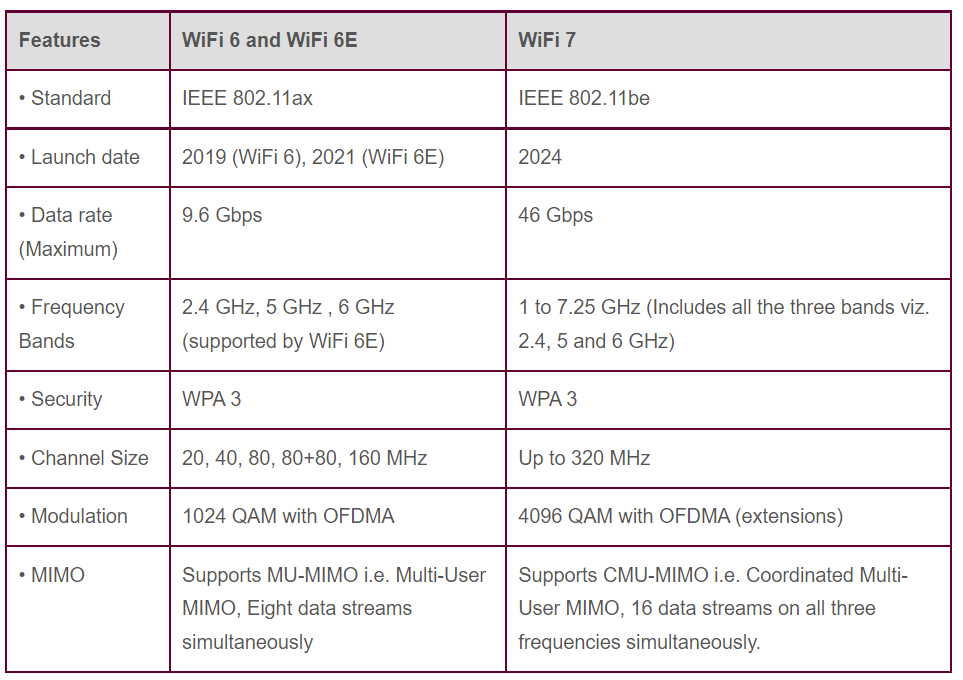
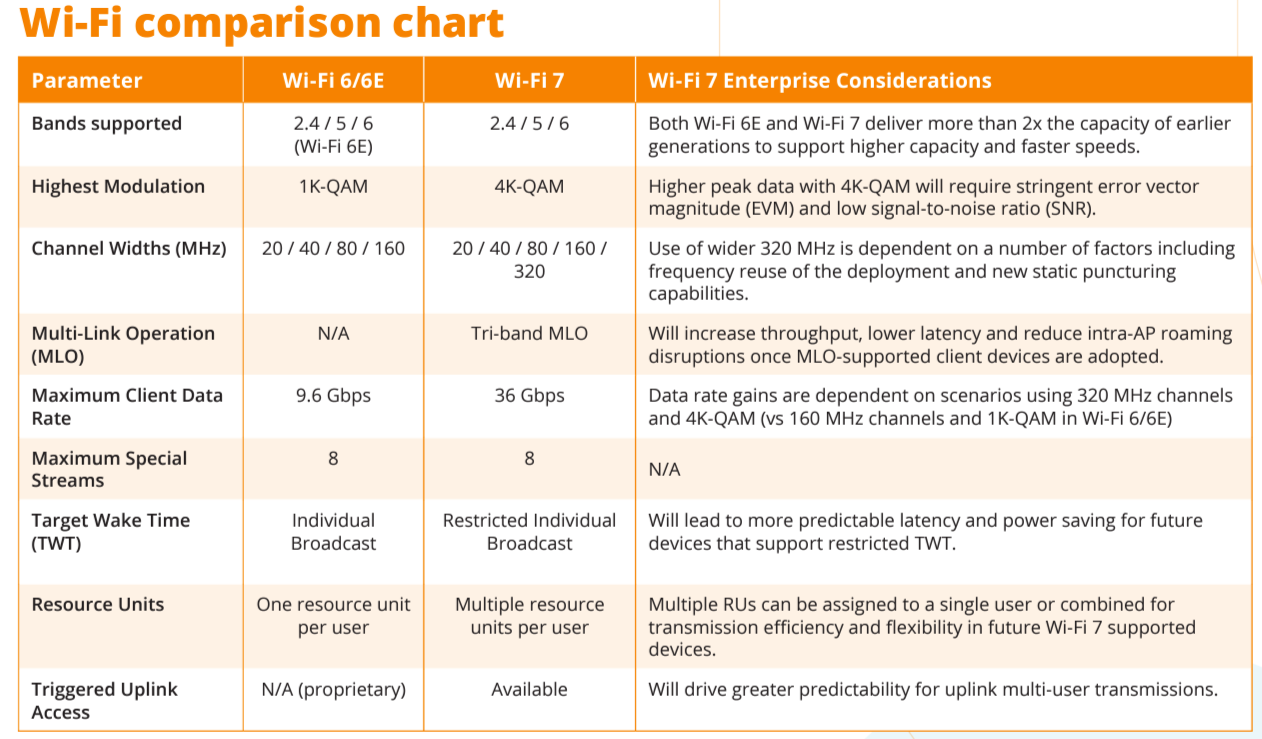
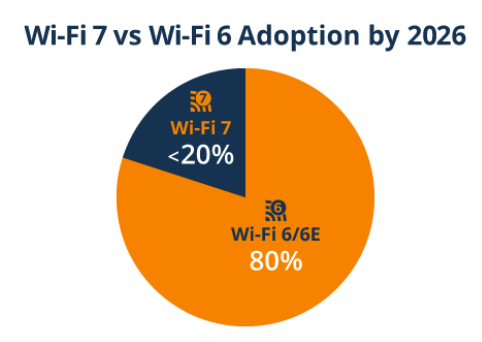
In this report, we introduce the latest technology: Wi-Fi 7. This new technology allows you to get internet download speeds double those of the current Wi-Fi 6 available in the market.

Many well-known companies that manufacture electronic chips (Chipsets) have announced the development of a chip that works with the new Wi-Fi 7 technology, the latest and most advanced generation after Wi-Fi 6 and Wi-Fi 6E.
The new Wi-Fi 7 technology can achieve download speeds of up to 5000Mbps by using the 320MHz bandwidth available in the 6GHz spectrum, almost double the current speed of Wi-Fi 6, which uses 160MHz in the 5GHz spectrum.
The new high-speed Wi-Fi 7 technology will suit crowded areas with many users, such as restaurants, train stations, airports, and large shopping malls. It will also be suitable for 8K televisions, provided that the television supports Wi-Fi 7 technology.
Many customers wonder if Wi-Fi 7 technology is expected to be a real alternative to network cables and their extensions within walls. The answer is yes, but only if all the devices you use support Wi-Fi 7 technology and you comply with the infrastructure requirements for operating Wi-Fi 7 devices, such as the cables connected to the Access Points installed and the 2.5GB switches required to support this high-speed technology.

wi fi 6
Wi fi 6
High-Speed Internet, Wi-Fi 7 technology

The Wi-Fi 7 Multi-Link Operation (MLO) feature:

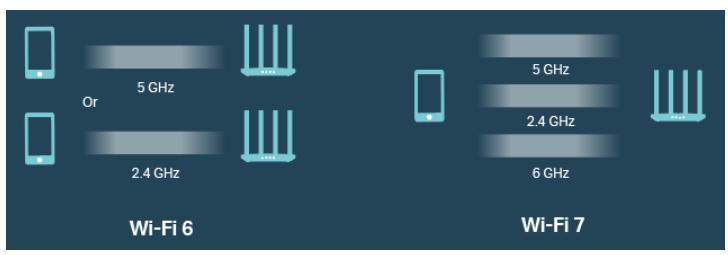
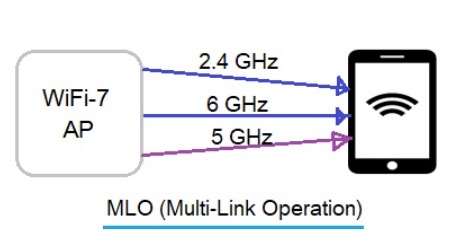
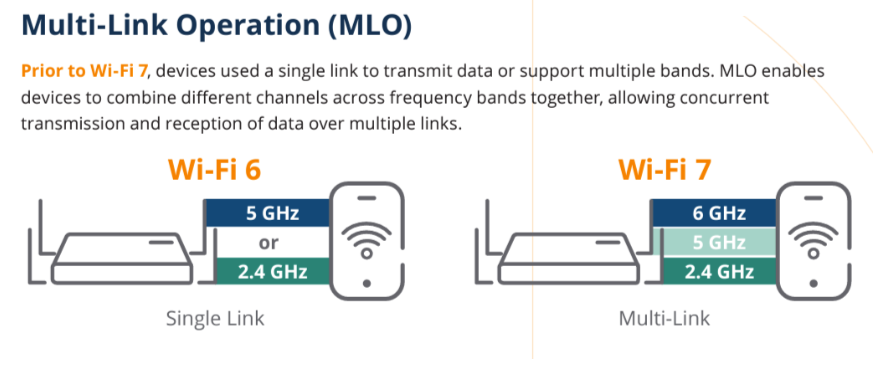
The Multi-Link Operation (MLO) feature in the new Wi-Fi 7 technology works by connecting your mobile phone or computer to all three networks available in the access point: 2.4GHz, 5.8GHz, and 6GHz. It combines the speeds of the three frequency bands, allowing you to transfer data at an extremely high speed that can reach up to:

High-Speed Internet, Wi-Fi 7 technology
Wi-Fi 7 technology wi fi 6

What is the Required Infrastructure to Properly Run WiFi7 Speeds at Home or Office?

1- You need a router with RJ45 ports that support 2.5GB speed.
2- You need a switch with RJ45 ports that support 2.5GB speed, 10GB Uplink ports connected by fiber optic cable, and 10GB SFP between the switches.
3- You need a cable between the router and switch that is at least CAT7a Shielded and preferably CAT8 Shielded.
4- The entire internet network and access point (AP) should be wired with CAT7a Shielded cable.
5- If there is an AP Controller device, it must support 2.5GB ports.
6- Your mobile phone and personal laptop must support WiFi 7 technology – please verify this before purchase.
7- For home projects, providing a 3/4-inch pipe for each CAT7a cable is recommended, running directly to the central collection point and to only one access point in the ceiling. This is because CAT7a Shielded cable is thicker than regular cables.

What is the meaning of (Shielded twisted pair cable (STP)?

STP cables were initially designed by IBM to solve the problem of data transfer speed loss, which was around 30% due to electromagnetic interference generated from within the cable wires during data transmission and the twisting of the wires inside the cable.
The solution involved shielding each pair of wires with a metallic material (typically tin-plated copper) to prevent these waves from interfering with each other.

XonTel provides the latest technologies at competitive prices, competing with its global counterparts. It also has a highly professional and efficient support team that accurately understands and meets the needs of all its customers. XonTel is considered the best choice.

For more information, contact us now. Click here.

Frequently Asked Questions (FAQ)

What is Wi-Fi 7 technology?

Wi-Fi 7 is the latest generation of Wi-Fi networks, designed to offer higher speeds, lower latency, and better capacity for handling a large number of connected devices at once. It suits smart homes, offices, commercial complexes, and places that need to transfer large amounts of data.

What is the difference between Wi-Fi 7 and Wi-Fi 6?

Wi-Fi 7 offers wider frequency bands and channels, with improvements that help increase data transfer speed and reduce latency compared to Wi-Fi 6. Wi-Fi 7 also supports advanced technologies such as Multi-Link Operation, which allows compatible devices to use more than one frequency band to improve speed and connection stability.

Is Wi-Fi 7 faster than Wi-Fi 6?

Yes, Wi-Fi 7 can offer higher theoretical speeds than Wi-Fi 6, especially when using a 320 MHz-wide channel and the 6 GHz band. However, actual speed depends on the router or access point specifications, the device used, internet speed, coverage quality, and network infrastructure.

What infrastructure and cabling are needed to run Wi-Fi 7 speeds efficiently at home or in the office?

Getting the most out of Wi-Fi 7 technology requires strict infrastructure preparations, including:

  • Routers and switches equipped with RJ45 ports supporting at least 2.5GB speed.
  • Using CAT7a Shielded or CAT8 network cables to ensure no speed loss and to avoid electromagnetic interference.
  • The devices used (phones and laptops) must already support Wi-Fi 7.
  • Providing a 3/4-inch conduit pipe for each individual cable, given the thickness of shielded cables.

What is meant by the Multi-Link Operation feature in Wi-Fi 7?

The Multi-Link Operation (MLO) feature allows a compatible device to use more than one wireless band or link within the network, such as 2.4, 5, and 6 GHz. This helps improve connection speed, reduce latency, and increase network stability in cases of congestion or wireless interference.

Do I need a new access point to benefit from Wi-Fi 7 technology?

Yes, a router or access point that supports Wi-Fi 7 must be used to benefit from its new features. The connected phone, computer, or device must also be compatible with Wi-Fi 7, otherwise it will operate using an older standard such as Wi-Fi 6 or Wi-Fi 5.

What role does the access point play in a Wi-Fi 7 network?

The access point is the device responsible for providing wireless coverage and connecting phones, computers, and smart devices to the network. In Wi-Fi 7 networks, the access point must support the high speeds, the required frequency bands, and suitable network ports so that the wired connection doesn’t become a bottleneck for wireless performance.

What is meant by Shielded Twisted Pair (STP) cables, and why are they necessary?

These are cables designed with tin-based shielding around each pair of wires inside the cable, aimed at preventing electromagnetic interference caused by data transmission within the wires themselves, which can cause speed loss of up to 30%. These cables are therefore essential when running high-speed access point networks to ensure stable, clean performance.

call2action-En

For more information about XonTel products and services, leave your data and one of our specialists will contact you

Maintenance and Repair of CCTV Surveillance Cameras

Posted on: May 31st, 2024 by xontel_admin
صيانة-وإصلاح-كاميرات-المراقبة

Surveillance cameras have become an essential part of security and monitoring systems, and surveillance cameras are a must in our homes and workplaces. Surveillance cameras are also considered a key and essential component in the smart home. They are no longer considered luxury as once, especially if you rely on surveillance cameras to ensure your property’s and people’s safety.
Like any other system or device, surveillance cameras require maintenance and repair. In this article, we will review the recommendations for maintaining and caring for surveillance camera systems and the system as a whole to ensure optimal performance and effective use.

صيانة-كاميرات-المراقبة
1- Periodic Cleaning of Cameras:

Dust and dirt can significantly affect image quality. Therefore, surveillance cameras must be continuously maintained and repaired by regularly cleaning the lenses and camera housings using dedicated cleaning tools and fluids. (Avoid using water or non-specialized chemicals that can damage the lenses.)

2- Checking Electrical Connections and Networks:

It is necessary to periodically ensure the safety of the electrical cables and connections for the surveillance cameras. Check them regularly to ensure there is no damage or cuts.

فحص-وصلات-الكهرباء-والشبكات repair surveillance cameras -maintaining surveillance cameras
حديث-الكاميرات-والنظام
3- Updating Cameras and the System:

It is necessary to ensure that surveillance camera programs are regularly updated. Camera manufacturers release periodic updates for the cameras and their management systems, which help improve the cameras’ performance and close security gaps.

4- Securing the Cameras:

To protect the cameras from theft or intentional damage. You may need to install them in hard-to-reach areas or use dedicated locks or enclosures.

إصلاح-كاميرات-المراقبة maintaining surveillance cameras repair surveillance cameras
فحص-جودة-الصورة
5- Image Quality Inspection:

Image quality should be periodically checked to ensure that the images are clear and there are no display issues per camera. If you notice any problems, check the camera and settings or replace the camera if necessary.

6- Backup the Recordings:

If required, or in some companies and institutions, it is their policy to retain the recordings for long periods as determined by each company based on need. Periodic backups of the recordings must be made. This ensures that you keep the recordings in case of a system failure.

نظام-كاميرات-المراقبة
توثيق حالة الكاميرات
7- Documenting Camera Status:

Some companies and government agencies require documentation of all maintenance of Surveillance Cameras and backup operations performed and having the person who performed the maintenance sign off on it.

At the end of the article, we reviewed the key points necessary for maintaining surveillance cameras, the steps required to repair surveillance cameras, and the necessary steps to keep the surveillance camera system strong and effective.
To learn more about XonTel cameras, click here.

Frequently Asked Questions (FAQ)

Why is surveillance camera maintenance necessary?

Regular surveillance camera maintenance helps maintain image clarity, recording stability, and connection integrity, and reduces the chances of the system suddenly failing. Preventive maintenance also helps detect minor faults before they turn into bigger, costlier problems.

How often should surveillance cameras be maintained?

The maintenance schedule depends on where the cameras are installed and the operating conditions. It’s best to do a visual inspection and simple cleaning every month or few months, along with a comprehensive maintenance check on the surveillance system once or twice a year, especially for businesses and outdoor locations.

What are the most important steps for surveillance camera maintenance?

The key maintenance steps include cleaning the lenses and covers, checking cables and connections, verifying image quality and night vision, reviewing recordings and storage capacity, updating camera and recorder software, and confirming the correct date, time, and system settings.

What causes a surveillance camera image to appear blurry or unclear?

A blurry image can result from dust buildup, moisture inside the housing, a shifted lens, poor lighting, or an issue with the cable or power source. It could also be due to low recording resolution or incorrect focus and image quality settings.

What should I do if a surveillance camera stops working?

Start by checking the power source, cables, and network ports, then restart the camera and the recording device. After that, check the network settings and the camera’s status within the surveillance system. If the problem persists, the camera, power unit, or cable may need repair or replacement.

How do I know if a DVR or NVR recording device needs maintenance?

Signs of a problem with the recording device include video no longer being saved, unusual noises from the hard drive, slow playback of recordings, the device restarting on its own, or error messages appearing. The device, hard drive, cooling, and connections should be checked when any of these signs appear.

Do surveillance cameras need software updates?

Yes, firmware updates help improve performance, fix bugs, and close security vulnerabilities. Updates should be downloaded from the manufacturer or an authorized supplier, making sure the version is compatible with the camera or recorder model before installing it.

When should surveillance cameras be repaired, and when should they be replaced?

Repairing surveillance cameras is suitable when there’s a minor fault in the connections, power source, or settings. Replacement may be better when the image sensor is damaged, faults keep recurring, resolution is inadequate for the location’s needs, or security update support has ended.

call2action-En

For more information about XonTel products and services, leave your data and one of our specialists will contact you

The Difference Between Analog CCTV Cameras and IP Cameras: Advantages and Disadvantages

Posted on: May 30th, 2024 by xontel_admin
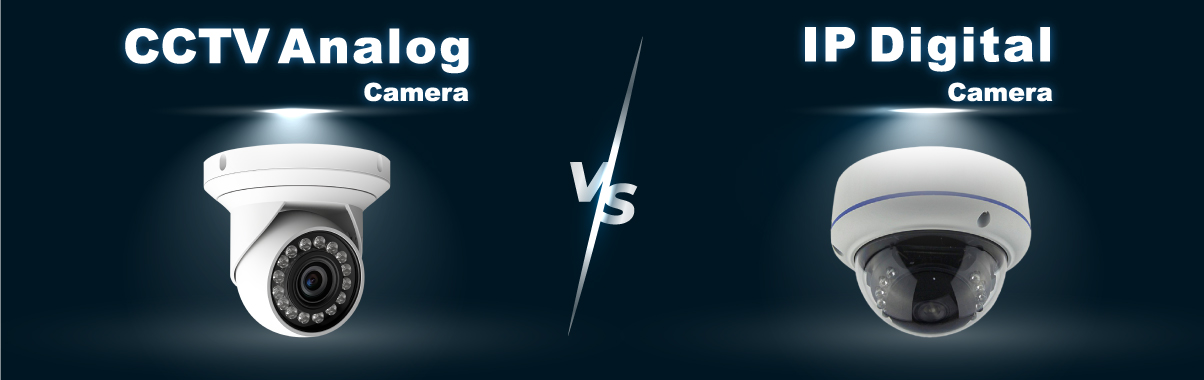
Analog CCTV Cameras IP Cameras

Modern IP-based surveillance cameras, also known as IP Cameras or IP Digital Cameras, and analog CCTV (Closed-Circuit Television) Cameras are widely used for security purposes. Each type has its strengths and weaknesses. Let’s explore the key features and drawbacks of each.

Firstly, IP Cameras:
Image Quality: IP cameras generally provide higher image resolution and clarity than traditional analog CCTV cameras. They can deliver high-definition and even ultra-high-definition (UHD) video.
Flexibility: IP cameras are more flexible in terms of installation. They can be easily integrated into a company’s or home’s internal network, and many support Power over Ethernet (PoE), which means that power and data can be transmitted through a single network cable without needing dedicated power adapters.
Remote Access and Control: IP cameras often integrate with the internal network, allowing for remote monitoring and access. You can view camera feeds from anywhere with an internet connection.
Advanced Features: IP cameras typically offer advanced features such as:

  • Motion detection and analysis with alert notifications
  • Some models have built-in microphones
  • Infrared night vision capabilities
  • Superb zoom and video enhancement capabilities
  • 180-degree panning ability
  • Mobile alert notifications
  • Ability to make VoIP (Voice over IP) calls over the network

Scalability: IP camera systems are generally more scalable. You can easily add more cameras to your network without significant changes to the infrastructure.
Secondly, CCTV Cameras (Analog):
Cost: Traditional CCTV systems are often more budget-friendly, especially for smaller locations. The cameras and their associated components are generally less expensive.
Ease of Installation and Operation: CCTV systems are relatively simple to set up and operate, making them the optimal choice for non-expert users.
Reliability: Some users claim that analog CCTV cameras systems may be more stable in some instances, as they operate independently of the network system and are thus isolated from common network issues.
Ultimately, the “optimal” choice depends on your requirements, the features you cannot compromise on, and the allocated budget. It may be beneficial to consult with security professionals to assess your needs. XonTel Technology is one such company that can assist you.

The Advantages

CCTV Camera

IP CCTV

Image resolution
Less
Higher
Image quality
worst
Better
Network connectivity
Requires additional equipment
Built-in
Remote access
No
Yes
Advanced features
No
Yes
The Cost
lower cost
More expensive
Ease of Installation
Easy
Hard

Frequently Asked Questions (FAQ)

What is the difference between IP cameras and analog surveillance cameras?

IP cameras send image and data digitally over the internet or local network, while analog surveillance cameras transmit video to a DVR device via dedicated cables, such as coaxial cable. IP cameras typically offer higher resolution, smart features, and greater scalability, while analog systems are known for easy installation and lower cost in some projects.

Is CCTV the same as analog surveillance cameras?

The term CCTV doesn’t refer to a specific technology; it means a closed-circuit television system used for security surveillance. A CCTV system can be made up of either analog surveillance cameras or IP cameras, so it’s more accurate to use the term to describe the entire surveillance system, not just the camera type.

Which offers better image quality: IP cameras or analog cameras?

IP cameras typically offer wider options in terms of resolution and detail, making them suitable when facial recognition, reading license plates, or covering large areas is needed. However, some modern analog surveillance cameras can offer high quality, and the choice depends on the required resolution and budget.

Which is less costly: IP cameras or analog surveillance cameras?

Analog surveillance camera systems are often less costly when installing a limited number of cameras or making use of existing cable infrastructure. IP cameras may have a higher initial cost, but they offer greater scalability and advanced features, and can reduce the amount of cabling needed when using PoE technology.

What are the key features of IP cameras that make them the preferred choice for businesses and homes?

IP cameras stand out in several key areas, including:

  • High image quality and resolution: delivering ultra-clear (UHD) video compared to traditional systems.
  • Remote access and control: the ability to watch live streams and camera recordings from anywhere in the world via the internet and mobile apps.
  • Flexibility and easy scalability: the ability to add new cameras to the network without changing the infrastructure, with PoE support to simplify wiring.
  • Smart, advanced features: such as motion detection, built-in microphones, advanced night vision, and instant mobile alerts.

When are analog surveillance cameras the more suitable choice for a user?

Analog CCTV cameras are an excellent choice in the following cases:

  • Limited budget: since the cost of the cameras and their related components is significantly lower compared to digital systems.
  • Simplicity of use: being easy-to-set-up and operate systems that don’t require advanced technical expertise.
  • Independent reliability: operating separately from the internet or local network, making them immune to network outage and interference issues.

call2action-En

For more information about XonTel products and services, leave your data and one of our specialists will contact you

Tips Before Buying Surveillance Cameras.

Posted on: May 30th, 2024 by xontel_admin
buying-Surveillance Cameras

Customers often buy surveillance camera systems without verifying their requirements or knowing some minor details that could completely change the purchase process from one type of security camera to another. A common problem after purchasing and installing the cameras is that the customer discovers that the system or the way it is distributed does not meet all of their needs or that some details that could have affected the purchase decision were overlooked.

In this article, we will review some of the details, tips, and guidelines that you should consider before purchasing surveillance cameras:

شراء-كاميرات-مراقبة

Make sure to select the correct number of security cameras that can cover the entire area from different angles. It is preferable if each camera “protects” another camera, as some customers choose a small number of cameras to cover a relatively large area in order to save costs. However, this way of thinking is wrong, and fixing this mistake will cost more than choosing the correct number of cameras from the beginning.

If the security camera installation location is outside the home or company, in the open air, or in direct sunlight, you must choose a camera with weather-resistant housing that can withstand temperature, rain, and other weather conditions.

If the camera is in a dark or dimly lit location at all times, you must purchase surveillance cameras with high-quality night vision capabilities.

The camera angle should be 180 degrees to cover the largest possible area.

The path of all camera connections and cables must be in a safe, hard-to-reach location.

Sufficient storage space – sometimes, a customer chooses storage units with small capacities to save costs. Later discovers that the available recording time is very short and is forced to change to a more prominent storage solution, which means higher repair costs.

Easy installation and replacement of surveillance cameras – Some complex cameras are difficult to install, require a specialized technician, and have higher replacement costs.

The camera operating system is simple and easy to use. Many cameras have complex operating systems that require a specialized technician to retrieve data or control them.

Ensure you purchase the latest and highest quality and resolution available on the market – The higher the resolution and quality, the more reliable and effective the security surveillance cameras will be, and vice versa.

Cloud storage capability: Sometimes, in the event of theft or fire, God forbid, the central camera storage units can be lost or damaged, meaning all evidence and recordings are lost. Therefore, some companies have provided cloud storage capability for cameras, making it easy to access recordings from anywhere, usually for a small monthly subscription fee.

Camera systems support and are compatible with communication systems: Some modern camera systems can connect and send messages or alerts to mobile phones or email for the homeowner in the event of suspicious movements or the presence of strangers at the home or workplace.

شراء-كاميرات-المراقبة

That covers the key tips to consider before purchasing security surveillance cameras.

For more information about XenTel cameras, click here.

Frequently Asked Questions (FAQ)

What are the most important tips before buying surveillance cameras?

Before buying surveillance cameras, you should determine the size of the location, areas that need coverage, the number of entrances and exits, the required image quality level, lighting conditions, and the storage method. You should also determine the need for night vision, audio recording, motion detection, and remote viewing.

How do I determine the number of surveillance cameras a location needs?

The number of surveillance cameras needed depends on the size of the location, the number of rooms and entrances, the presence of hallways or blind spots, and each camera’s field of view. It’s best to prepare a site plan before installation to determine camera placements and ensure no important areas are left unmonitored.

How do you choose the right camera for the lighting conditions and installation location (indoor or outdoor)?

Camera choice depends directly on the location:

  • Outdoor locations: require cameras with sturdy housings resistant to high temperatures, rain, and direct sunlight.
  • Dim or dark locations: cameras with advanced night vision features and infrared should be chosen to ensure high-quality vision in complete darkness.

What is the importance of cloud storage and mobile compatibility features in modern surveillance cameras?

Modern technologies add extra layers of security through:

  • Cloud storage: protects evidence and recordings from being lost if local storage units are stolen or damaged (God forbid, due to fire), with the ability to access them from anywhere.
  • Compatibility with communication systems: the ability to link surveillance cameras to smartphones or email to send instant alerts when suspicious movement or strangers are detected at the location.

Why is it always recommended to choose the latest, easiest-to-operate technologies when buying surveillance cameras?

Choosing modern, user-friendly systems ensures:

  • Getting the highest possible resolution and image quality, increasing the system’s effectiveness and reliability in capturing details.
  • Easy data retrieval and camera control without constantly needing a specialized technician.
  • Flexibility for future installation and replacement without incurring hefty additional costs to rebuild the system.

What are common mistakes when buying surveillance cameras?

Common mistakes include buying an insufficient number of cameras, choosing too small a storage capacity, neglecting night vision, not protecting cables, focusing on price alone, choosing a resolution unsuitable for the location, and not planning for future expansion.

How do I choose a surveillance camera installation company?

It’s best to choose a company that offers a site survey, a camera layout plan, a warranty on equipment and installation, and after-sales technical support. The company should also clarify the type of equipment, storage capacity, costs, and included features before implementing the system.

How do I protect surveillance camera cables?

Cables should be run inside protected conduits or channels, and kept away from exposed, easily accessible areas. Outdoor connections should also be protected from water and moisture, and network cables should avoid running near electrical sources that could cause interference.

call2action-En

For more information about XonTel products and services, leave your data and one of our specialists will contact you

Guide to Purchasing Ceiling Speakers

Posted on: May 28th, 2024 by xontel_admin
ceiling-speaker-wall speaker-stereo speaker-bluetooth speaker-Amplifiers

If you intend to purchase ceiling speakers or wall speakers for your home but don’t know where to start, here’s some advice: Unlike many other regular speaker products, ceiling speakers are designed to be a long-term audio solution, and therefore, it’s important to think not only about the level of sound quality you want but also how you want to control the speaker system fully.

This is your simple and easy guide to the most essential information you need to know about those speakers.

9 things you need to know before buying ceiling speakers:
wall speakers
1- How many ceiling speakers do I need in the room?

Usually, they come in pairs, one speaker for the right side and another for the left side, resulting in a true surround stereo sound. As a general guideline, we recommend using one pair of ceiling speakers in rooms larger than 3m x 3m, and for rooms larger than 5m x 5m, two pairs of ceiling speakers will provide a more balanced sound.

2- Do I need stereo or mono speakers?

We always recommend using pairs of standard mono-type ceiling speakers for rooms larger than 3m x 3m, but in some cases, like bathrooms and smaller rooms where space is limited, stereo speakers can be an ideal choice.

3- Where should the speakers be placed on the ceiling?

If you’re installing a single stereo speaker, you should aim to place it in the center of the ceiling (if possible) to get the best sound distribution. If you’re installing multiple speakers, the optimal placement is at an equal distance from all the room’s walls and at least 2 meters apart from each other.

4- How do I power and control the ceiling speakers?

1- There are two options available when it comes to powering and controlling speakers. Active speakers have built-in amplifiers and only require a direct power connection. You can control these amplifiers directly via Bluetooth or WiFi from your device.

2- Passive ceiling speakers are ubiquitous and require an external amplifier to power them through speaker cables. This allows you to control the speakers’ amplifiers using WiFi through an app streaming from your device.

5- Do ceiling speakers require fire-resistant covers?

Although it is not a legal requirement, we strongly recommend using fire protection covers for the safety they provide.

6- Can I install ceiling speakers in high-moisture rooms like kitchens, bathrooms, and saunas?

Most ceiling speakers are suitable for humid environments, but we also have IP-protected (ingress protection) speakers that protect against dust and moisture. These are a great solution when installing sound in areas with high moisture levels, like bathrooms and saunas.

7- Can I paint my ceiling speakers to match my room?

The grilles that come with all ceiling speakers are usually white but can be spray painted in any color you desire.

8- Can I install ceiling speakers in outdoor roofs or balconies?

While outdoor ceiling speakers have been popular for some time, they are usually wall-mounted or camouflaged speakers hidden among potted plants or within landscape borders. However, with the emergence of specialized models designed to withstand the elements, you can now install ceiling speakers in outdoor areas.

9- Can I connect my TV to the ceiling speakers?

Yes, you can run the TV audio through the ceiling-mounted speakers. If the TV supports Bluetooth, and there are Bluetooth speakers, you can also connect them.

ceiling speakers

XonTel is a leading company in speakers and amplifiers. It offers a variety of wall-mounted speakers, ceiling speakers, Bluetooth speakers, and amplifiers.

Xontel speakers

sources

Related Products:

Frequently Asked Questions (FAQ)

How do you determine the right number of ceiling speakers and their proper placement in a room?

Determining the number of ceiling speakers depends on the size of the room, to ensure balanced sound distribution:

  • Small rooms (larger than 3 × 3 meters): one pair of speakers (left and right) is usually enough for full stereo sound.
  • Large rooms (larger than 5 × 5 meters): two pairs of speakers are recommended to achieve ideal sound distribution.
  • Placement: it’s best to place a single stereo pair in the middle of the ceiling, while multiple speakers should be spaced evenly from the walls, with at least two meters between each speaker.

What is the difference between active and passive ceiling speakers in terms of operation and control?

  • Active speakers: contain a built-in amplifier, require direct connection to power, and can be controlled wirelessly via Bluetooth or Wi-Fi from your smart devices.
  • Passive speakers: need an external amplifier they’re connected to via speaker cables, and audio playback can be controlled through dedicated apps on devices.

Can ceiling and wall speakers be used in humid or outdoor areas (such as bathrooms and rooftops)?

Yes, dedicated models are available with specific protection ratings (IP) resistant to dust and high humidity, making them ideal for installation in kitchens, bathrooms, and saunas. Weather-resistant models designed for balconies and outdoor areas are also available, with the option to paint the white speaker grilles any color to match the room’s decor.

How do I choose a suitable amplifier for ceiling speakers?

You should make sure the amplifier’s power output matches the speakers’ power rating, along with matching impedance, the number of channels, and the number of speakers to be run. You should also determine whether you need Bluetooth or Wi-Fi, or the ability to play multiple audio zones independently.

Can ceiling speakers be connected to a TV?

Yes, TV audio can be played through ceiling speakers using an amplifier or receiver connected to the TV’s audio output, such as HDMI ARC or the optical output. Bluetooth can be used with compatible systems, but a wired connection is generally more stable and has less audio delay.

Do ceiling speakers need fire-rated back boxes?

This depends on the type of ceiling and local building and safety requirements. Fire-rated back boxes can help protect the ceiling cavity and reduce sound and dust transfer, and may be required in some buildings, so local site requirements should be checked before installation.

What are the most important tips before buying ceiling speakers?

Before buying ceiling speakers, you should determine the room’s size, the number of speakers, whether the system is active or passive, the amplifier’s location, the control method, moisture resistance, and access to ceiling wiring. You should also make sure the speakers are compatible with the amplifier and that there’s enough installation space.

What are the common mistakes when buying ceiling speakers?

Common mistakes include purchasing an insufficient number of speakers, distributing them unevenly, failing to match the speakers with the amplifier, using indoor speakers in humid and outdoor areas, or ignoring ceiling depth, electrical wiring, and HVAC routing.

call2action-En

For more information about XonTel products and services, leave your data and one of our specialists will contact you

The importance of Access Points or Range Extenders for smart homes

Posted on: October 25th, 2023 by xontel_admin

In this post, we’ll discuss the importance of the Access Point or range extender, as nowadays everything depends extensively on the use of technology and the internet entertainment devices such as PlayStations, Xboxes, smart TVs, iPhones, and Android phones have become an essential role in our daily lives.
However, one of the most common challenges faced by users of these devices is the quality and speed of Wi-Fi connectivity in their homes.
This is where the importance of the XT-5400AX Access Point lies, as it enhances the overall user experience.

أكسس بوينت - مقوي الشبكات

An Access Point or range extender, can be defined as a device that helps extend the coverage of a Wi-Fi network and strengthen its signal within the home, workplace, or any other location where it is used.
This means that an Access Point  can significantly improve coverage and increase connection speeds for devices that rely on an internet connection to run games or stream content.

For PlayStation and Xbox gamers, using a high-quality, efficient network extender is essential to avoid connection delays and annoying interruptions while playing online. In addition, a network extender can help reduce loading times and speed up game response times, contributing to an enjoyable gaming experience for the user.

As for smart TVs, they rely heavily on Wi-Fi to receive online content, especially after the rise of streaming services such as Netflix, Amazon, Disney, and others. With a powerful and effective network extender, users can watch movies and TV shows in high quality without interruptions.

Access Point (Network Extender or Range Extender)
XT-3000AX


The support provided by a network extender or access point plays a significant role in delivering an exceptional experience for users of entertainment devices.

If you’re a fan of gaming on PlayStation or Xbox, or enjoy online television streaming, investing in a network extender can be a wise decision to ensure connection stability and high performance. 

إكس بوكس
Xbox
بلاي ستيشن
PlayStation

XonTel Technology seeks to provide the best and latest communication solutions and internet distribution through access point devices such as the Xontel XT-5400AX, equipped with the latest technology and high speed that rivals its international counterparts at competitive prices, makes it ideal for indoor buildings such as company offices, homes, villas, and government institutions.

Frequently Asked Questions (FAQ)

What is a network booster or range extender (access point), and what is its main function?

A range extender or access point is an advanced network device (such as the XonTel XT-5400AX) used to extend the coverage range of a Wi-Fi network and boost its signal within homes, offices, and businesses. Its main function is to eliminate dead zones, improve coverage quality, and increase internet connection speed for various devices to ensure an uninterrupted user experience.

What are the benefits of using a range extender with smart TVs and digital streaming platforms?

Modern digital streaming platforms (like Netflix and Amazon) rely heavily on Wi-Fi speed to deliver content in superior quality. When a strong, effective access point is installed, users can watch movies and TV shows in high resolution (HD and 4K) completely smoothly, without any buffering or annoying interruptions.

Where should a network booster be installed?

A network booster should be installed in a location that still receives a good signal from the router, not in an area with no signal at all. It’s best placed at a midpoint between the router and the area where coverage needs improving, away from obstacles and devices that cause wireless interference.

How does an access point improve the online gaming experience on PlayStation and Xbox?

Online gaming depends on connection stability and speed, so using a high-efficiency network booster helps with:

  • Avoiding lag and annoying disconnections during gameplay.
  • Reducing game and map loading times.
  • Increasing response speed, giving players a smooth, enjoyable experience without any interruptions.

How do I choose the best network booster for my home?

The size of the home, the number of floors, internet speed, the number of connected devices, the supported Wi-Fi version, availability of Ethernet ports, and ease of management should all be considered. It should also be determined whether the issue needs a simple range extender, an access point, or a full mesh system.

What is the difference between a range extender and a mesh system?

A range extender rebroadcasts the Wi-Fi network from a single point, and may create a separate network name in some cases. A mesh system, on the other hand, consists of multiple units working together to provide a unified network and smoother coverage, making it more suitable for large, multi-room homes.

call2action-En

For more information about XonTel products and services, leave your data and one of our specialists will contact you