What is a Motion Sensor?

Posted on: August 13th, 2021 by xontel_admin

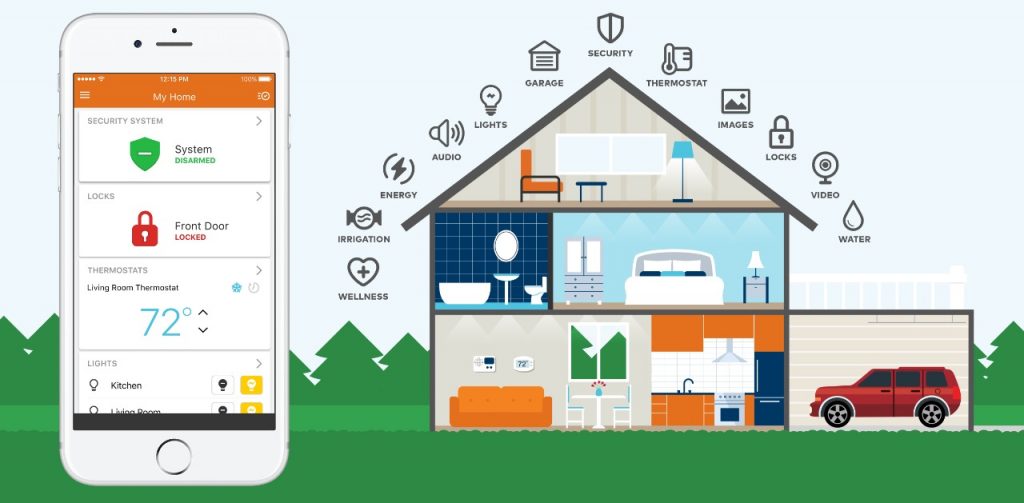
Over the past decade or so, we have all become accustomed to managing many aspects of our lives through technology, as the internet has made life easier and more comfortable. Alongside this technological development, home technology has also advanced, giving rise to what is known as the “smart home.” A smart home is a collection of technological tools and devices that help you manage your home in an intelligent and innovative way.

What is Smart Home Technology?

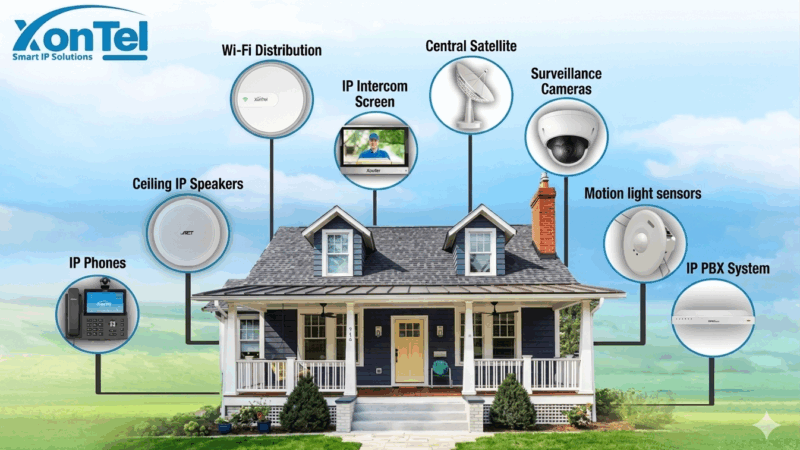
Smart home technology allows you to control your home more efficiently — from your doorbell and intercom to your lighting, home security, heating, cooling, and water temperature control. Everything can be managed and monitored remotely through technology, even the opening and closing of your curtains.

One of the most essential and indispensable devices in any smart home is the motion sensor or Motion light Sensor. It provides safety and security for your home, valuable possessions, and family. The lighting motion sensor detects and monitors any movement of people or even animals using infrared technology. When movement is detected, an alarm is automatically triggered. It can also be used to automatically turn on lights when motion is detected — making it ideal if you wake up during the night.

Advantages of the XonTel Motion light Sensor:

مستشعر الحركة حساس الحركة زونتل
  • Equipped with a smart and powerful sensor for detecting any movement.
  • Uses infrared technology to detect the motion of people and animals.
  • Can be set to automatically turn on the lights when movement is detected nearby.
  • Enhances the safety and security of your home, family, and belongings.
  • Saves energy and reduces electricity bills.
  • Extends the lifespan of lighting fixtures.
  • Detects movement at various distances depending on the sensor’s capacity.
  • Allows control over lighting duration and automatic shut-off.
  • Enables lighting control during day and night.
  • Eliminates the need for traditional light switches and wiring.
  • Can be connected to and control bathroom exhaust fans.

XonTel is the first and only Arab company to develop and manufacture motion sensors or motion light sensors.

The company offers the latest technologies that rival global competitors at competitive prices, along with a highly skilled professional support team dedicated to accurately and efficiently meeting all customer needs — making XonTel the best choice

For more information about XonTel sensors, click here.

call2action-En

For more information about XonTel products and services, leave your data and one of our specialists will contact you

Best PBX Systems in Kuwait: Complete Guide & Top Companies

Posted on: July 20th, 2021 by xontel_admin

What Are PBX Systems?

شركات-البدالات-بالكويت

With the rapid development of communication technologies worldwide and the increasing number and size of companies, the number of employees has grown significantly. As organizations expand, the need to organize and manage communications has become essential. This includes:

  • Facilitating communication among employees within the same branch.
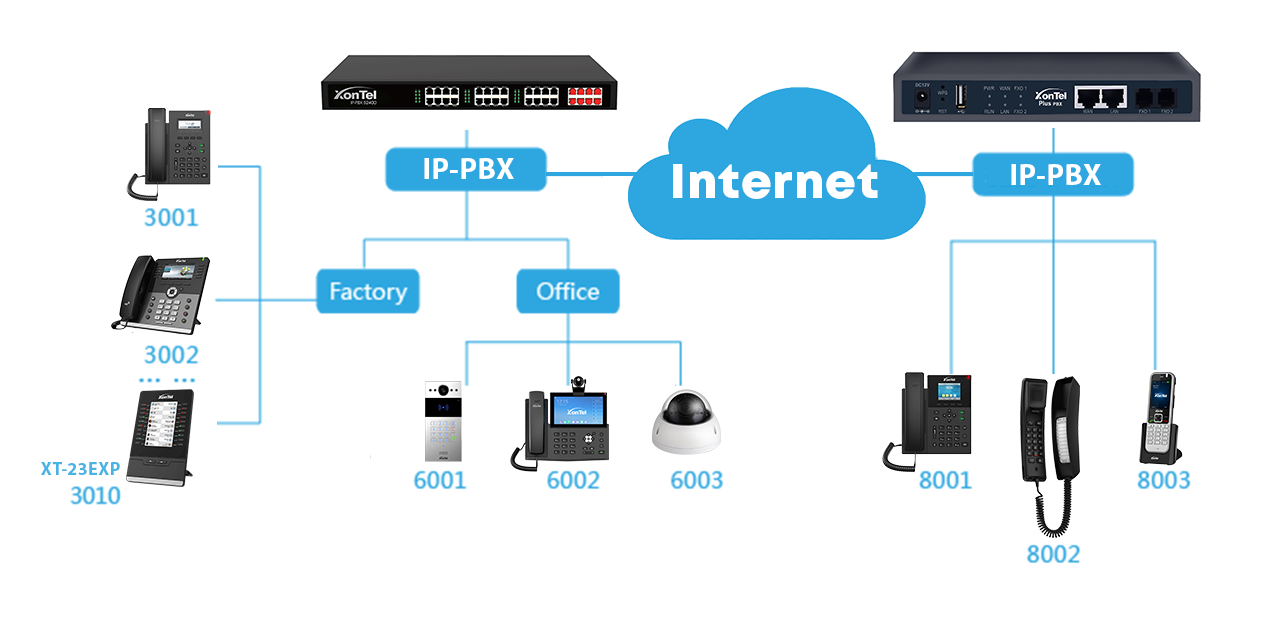
  • Organizing communication between company branches and linking them with the main headquarters.
  • Managing external calls between clients and company employees.

From this need, the importance of PBX systems emerged. These systems were invented and developed to facilitate communication both within and outside the company. They create an internal communication network that allows employees to connect with one another without using external telephone lines.

The main goal is to establish a free internal communication system, which helps significantly reduce communication costs.

For example, imagine having more than 100 employees, each needing to communicate with colleagues and clients through an individual phone line — the total cost would be extremely high, and it would put a great deal of pressure on the company’s communication system.

Facilitating communication between employees within a single company branch

Organizing communications between company branches, connecting them with each other and linking them to the main headquarters.

Routing calls from external customers to inside the company.

Importance and Features of PBX Systems:

  • Easy communication between external clients and internal employees.
  • Smooth communication between employees within the company.
  • Ability to record all calls to ensure service quality.
  • Control over which employees can make external or international calls.
  • Access to detailed reports for quality management.
  • Organized handling of peak-hour communications.
  • A single unified company number that can be directed to multiple extensions.
  • Ability to connect with the intercom and other communication devices.

Types of PBX Systems:

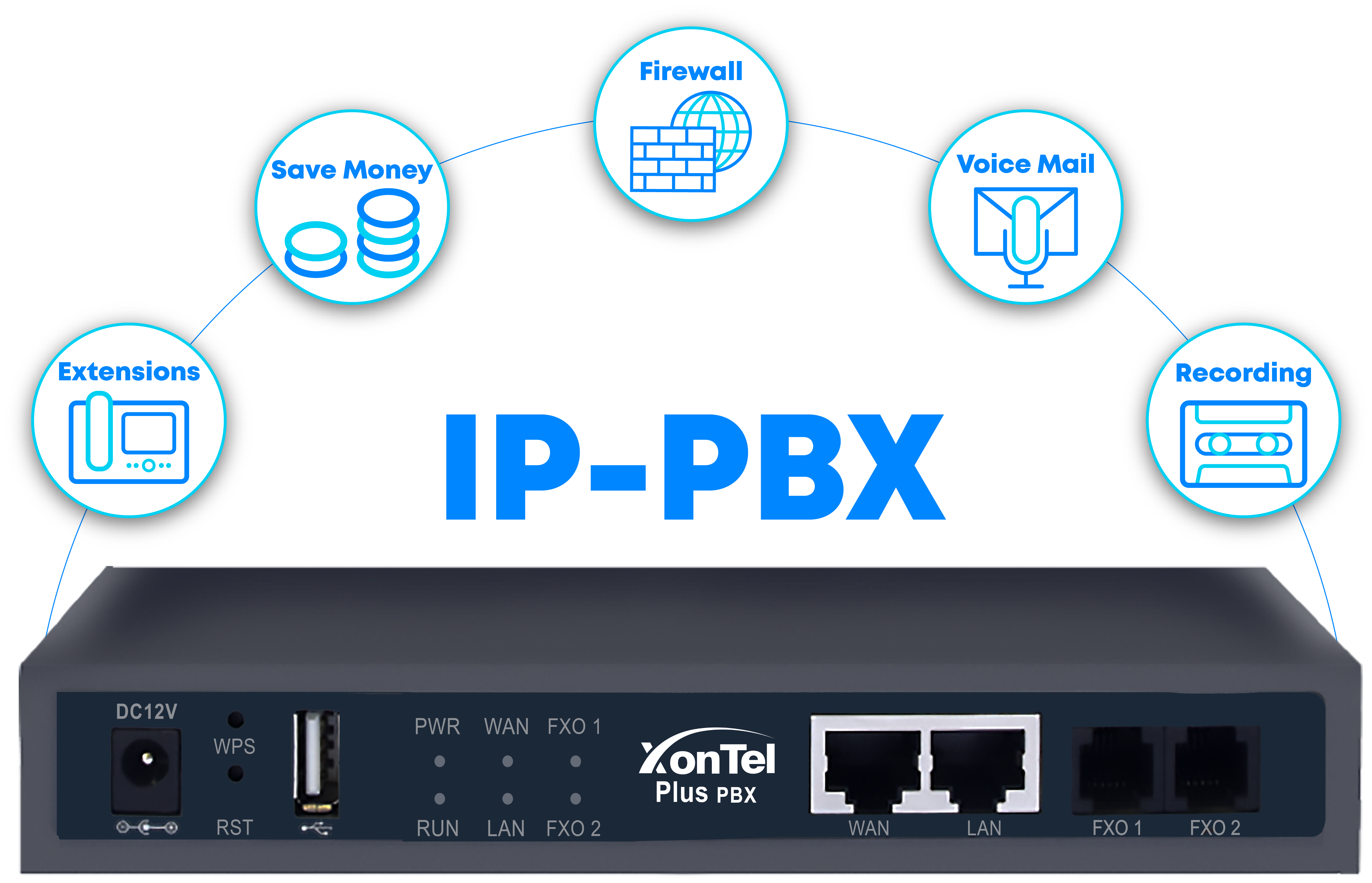
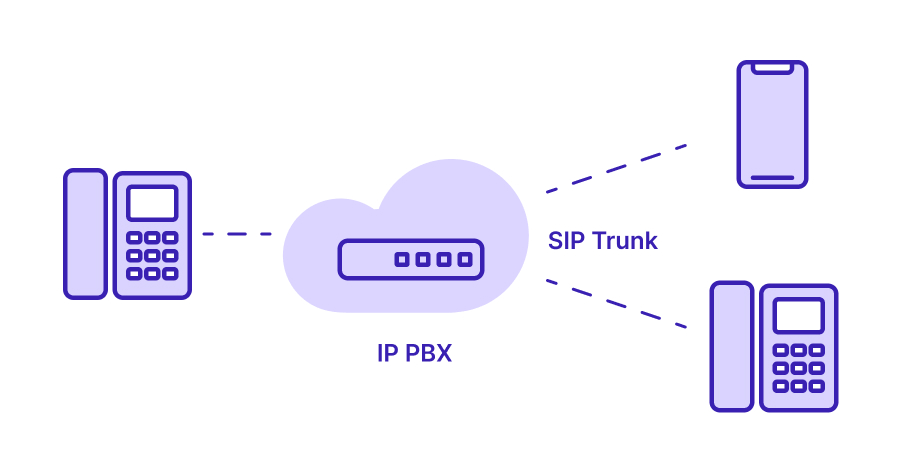
There are two main types of PBX systems: traditional analog PBX and modern IP-PBX systems.

Key Advantages of IP PBX Systems:

  • Easy to relocate the internal IP PBX system to another location.
  • Seamless connectivity with other networked devices inside or outside the company.
  • Transfers voice data using advanced IP technology.
  • Supports Internet Protocol (IP) phones that enable efficient internal and external communication, whether from desktop or mobile devices.
  • Offers multiple smart features unavailable in digital phones — such as visual voicemail, personal folders, and advanced call management functions.

Who Needs PBX Systems?

PBX systems can be used in a wide variety of environments:

  • Homes and villas
  • Government ministries and institutions
  • Banks and large corporations
  • Tourist resorts and hotels
  • Any organization or establishment that employs several people who need constant communication — internally between employees or externally with clients

The Best PBX Companies in Kuwait – Kuwait PBX Systems

XonTel is the first and only Arab company that develops and manufactures IP PBX systems (Kuwait PBX) using advanced technology.

XonTel is considered a leader and one of the best PBX companies in Kuwait, with a long-standing reputation and proven success across many government ministries and private companies.

The company offers the latest technologies that compete with global brands at competitive prices, along with a highly skilled and professional support team capable of understanding and meeting all client needs with precision and efficiency.
XonTel is the best choice for PBX systems in Kuwait.

For more information about XonTel PBX systems (Kuwait PBX), visit our PBX products page.

call2action-En

For more information about XonTel products and services, leave your data and one of our specialists will contact you

Features of XonTel MS IP-PBX

Posted on: June 20th, 2021 by xontel_admin
بدالات زونتل سنترالات زونتل

Features of XonTel PBX Systems for Homes and Apartments

Feature 1

Using the PBX and Intercom with Call Forwarding to Mobile:

XonTel smart PBX systems can forward a visitor’s call from your home door intercom directly to your mobile phone if you are not at home.

Feature 2

Easy to Use and Customize Features and Services:

XonTel PBX systems are designed to be user-friendly for all household members.

Feature 3

Internal Calls from Your Mobile:

Use your landline number through your mobile phone and make calls with your home PBX internal number using the XonTel app, available for iPhone and Android.

Feature 4

No More Unwanted Calls for Families:

Block any unwanted mobile or landline numbers from calling your home (Black List feature).

Feature 5

Voice Group Calling for Family Announcements:

Households can now call all family members at once using a single internal number.

Feature 6

Cost Saving with a Single Cable for Phones and Internet:

Easily distribute, connect, and cover both your internal phone network and internet to all rooms using one cable only, thanks to XonTel central PBX systems (MS PBX).

Feature 7

Free Calls Connecting Multiple Homes for the Same Family:

Connect two or more family homes into one phone network to make free internal calls without using the landline, from anywhere.

Feature 8

Detailed Call Reports:

Provides detailed reports of all incoming, outgoing, and internal calls in the home.

Feature 9

Managing Domestic Staff and Smart XonTel Solutions:

Restrict domestic staff from using the landline, and prevent them from calling each other through the internal numbers.

Feature 10

Rental Apartments and XonTel Central PBX (MS PBX):

Smart PBX systems serve both owners and tenants. Each apartment has its own internal numbers and private intercom, separated from other apartments, while the owner’s number remains independent — ensuring full privacy for everyone.

  • Certified internationally by FCC (USA) and CE (Europe) for quality standards.
  • Accredited by IEEE, the global organization for information integrity.
  • YouTube training videos available to guide on managing PBX features and services (search for “XonTel”).

XonTel offers the latest technologies that compete with global brands at competitive prices, along with a professional, highly skilled support team dedicated to accurately meeting all customer needs with high efficiency, making it the best choice.

For more information, contact us now click here

call2action-En

For more information about XonTel products and services, leave your data and one of our specialists will contact you

How to Overcome Common VoIP Problems

Posted on: June 8th, 2021 by xontel_admin

Many companies face issues with Voice over Internet Protocol (VoIP) systems, which can affect the stability or even the continuity of service.

In this article, we highlight the most common VoIP problems that users may encounter,
as well as the types of issues that may affect your network.
We’ll explore the various forms and types of problems you might face in your telecommunications network.

How to Overcome Common VoIP Problems

The most frequent issues with VoIP or internet-based calls include:
Poor audio quality, dropped or intermittent calls, calls that are not audible, or calls where only one side can hear the other.
In some cases, calls may completely fail, preventing both parties from hearing each other.Persistent issues like these can damage a company’s relationship with clients and may drive customers to competitors.
There are free tools and simple tests you can use to determine the cause of VoIP issues, such as internet speed tests, network performance and quality tests, and packet loss measurements.
While these tools won’t directly fix the problem, they can give you insight into the location and magnitude of network issues.


Here's how to use each of these tools to diagnose and troubleshoot:

1. Internet Speed Test

Also known as a VoIP speed test, this measures whether you have sufficient bandwidth for VoIP calls.
It’s a quick way to determine if you have enough upload capacity to make calls over the internet.
The internet speed and upload capacity directly affect how well call data is transmitted between you and the person you’re calling, which can significantly impact call quality.
Each VoIP call typically requires around 100 Kbps for both download and upload.You should calculate the number of employees and expected concurrent calls accurately to determine the necessary internet speed and capacity to ensure stable and continuous communication.
If you experience problems during peak hours, it may indicate the need for higher internet speed or upload capacity.
During peak hours, employees are also sending emails, using web applications, watching videos, and consuming bandwidth on other activities, which directly and primarily affects call quality.
You should consider all these factors when determining your internet speed and upload capacity to resolve any VoIP issues that may appear in your company.

2. Data Transfer Speed and Packet Loss

The ping test is a free network troubleshooting tool available on all operating systems.
This test measures the time it takes for data to travel between two points on the internet, for example, between your computer and another device on the network. It measures speed and packet loss rates, both of which can have a significant impact on VoIP calls.

For example, if the result exceeds 100 milliseconds, calls may be affected, and you should take a closer look at your internet line quality and the service efficiency of your ISP.
For instance, imagine two devices communicating via VoIP—one transmits data at 10 ms and the other at 200 ms. This will inevitably cause audio delays, affecting call quality and continuity.

3. Traceroute

Once you’ve determined that you’re experiencing packet loss, you can run a traceroute test to find out exactly where the problem occurs.
Traceroute can tell you what potential obstacles exist with your internet connection. This test displays all the points your data packets pass through and the time taken at each point.

For example, when communicating with a device in another country, data passes through an average of 12 points before reaching the other party. This test shows all those points and displays the time consumed at each one.

If there's a problem or packet loss at any point:

You can change your internet service provider or find an alternative solution for that point. Once the cause is identified, you can follow up with the person or company responsible, whether it’s your local area network (LAN), your Internet Service Provider (ISP), or your VoIP service provider.
If the problem is with your internal network, the Traceroute test will likely show you where the issue is within your internal network.
You’ll need to check your internal network devices and firewall until the problem is resolved.
If the problem is with your Internet Service Provider, then you need to review with your ISP. You should review your Service Level Agreement (SLA) to determine the cause of the problem, work to resolve it, and ensure it doesn’t recur.

The above are the most common VoIP problems and how to work on resolving and avoiding them in the future.

XonTel is a leading company in the Arab world providing solutions for VoIP and SIP problems, internet-based communication systems, SIP Trunk services, and all modern telecommunication solutions for businesses and individuals.

For more XonTel services and products click here

Source 1

Follow us on LinkedIn

call2action-En

For more information about XonTel products and services, leave your data and one of our specialists will contact you

4 Benefits of Converting Voicemail to Email

Posted on: June 8th, 2021 by xontel_admin

With the advancement of communication systems in the modern era and the rise of internet-based modern communication systems, also known as VoIP technology, companies increasingly rely on VoIP services. One helpful feature is forwarding voicemail to your email inbox, and VoIP providers now compete to offer this service.
But what real value does this feature provide? Here are four key benefits of converting voicemail to email:

Benefits of Converting Voicemail to Email:

1. Easy Access to Voicemail

Studies show that the average American employee spends about 4 hours a day checking work emails. This means in an 8-hour workday, email is checked approximately every 2 minutes.
Email management is central to the American employee’s workflow. To ensure accurate voicemail tracking without fear of missing any messages, forwarding voicemail to email makes it easier for you and your employees to see and manage new voicemail messages effectively.
The alternative is for employees to wait for their desk phone to light up or sound an alert for new voicemail. Most people miss this notification or overlook it, at least initially.
When employees use their office phones continuously and intensively, errors can occur, and many voicemail notifications may be overlooked, requiring constant phone monitoring.
Therefore, forwarding voicemail to email makes it easy to receive and listen to voicemail recordings without fear of missing any.

2. Faster Response Time

The faster you receive a voicemail message, the quicker you can respond to its contents. This speed and responsiveness enhance your company’s customer relationships and strengthen client loyalty.
According to a study by a UK telecommunications company, 85% of callers who cannot reach your company on the first attempt will not try again, and 75% will not leave a voicemail.
When a client leaves you a voicemail message, this actually indicates their seriousness in learning more about your service. However, waiting too long to respond to customer voicemail messages can kill the caller’s enthusiasm toward your company.
If a customer leaves a voicemail, your team should respond within 10-15 minutes. Of course, forwarding voicemail to email allows your team members to see new messages within minutes.
In some cases, you may need to set your phone to Do Not Disturb (DND), In this case, phone calls will automatically be sent to voicemail if you don’t have call forwarding set up to an external number. With the voicemail-to-email feature, you are immediately notified of all new messages, Even if you’re unable to return the call by phone, you may be able to send a quick email to the caller acknowledging that you’ve received their message and will respond fully later.

3. Access Voicemail on Mobile Devices

The feature of forwarding voicemail to email and then to mobile devices lets you access your voicemail inbox from anywhere, whether you’re at work or away, during business hours or after official working hours.

4. Saving and Archiving Messages

Converting voicemail to email is a useful archival tool. You can store attachments in an email folder or download files to your computer, smartphone, or tablet.
If you work in a field that requires archiving or simply want to keep detailed records, one advantage of forwarding is that it can automatically create a comprehensive archive of all your recordings. The archiving process includes the message time and date, as well as the caller ID information in the filename.
This makes recordings easier to sort and retrieve, and the archiving process takes only a few megabytes of your existing storage disk space.
You can also store them on third-party platforms or cloud computing for easy access from anywhere.
If you run a business that receives voicemail messages from customers, you may want to consider the voicemail-to-email forwarding feature for your employees.
This feature can make you and your team more responsive and flexible in responding to your customers.

XonTel is a leading company in the Arab world providing VoIP and SIP solutions, internet-based communication systems, SIP Trunk services, and modern telecommunication solutions for businesses and individuals.
For more information about XonTel’s products and services click here

Source: 1

call2action-En

For more information about XonTel products and services, leave your data and one of our specialists will contact you

How does SIP Trunk help you in your business?

Posted on: June 8th, 2021 by xontel_admin

Today, companies of all sizes rely heavily on modern communication networks and systems to remain competitive and achieve their goals.
With the advancement of communication technology, traditional phone networks no longer provide the flexibility or efficiency required to keep up with technological developments and meet customer expectations. This is one of the main reasons businesses are shifting to internet-based communication systems (VoIP), which offer numerous advantages, greater flexibility, high efficiency, and very competitive costs compared to traditional phone systems.

What is SIP Trunking?

SIP Trunking is essentially the connection of your company’s internal phone system to the internet. Companies no longer need to rely on traditional telephone lines to meet their communication needs. Through SIP Trunking, businesses can connect branches or offices worldwide without using the traditional PSTN (Public Switched Telephone Network). Calls can be routed via the internal phone network or the local PSTN at the destination. These services are provided through SIP Trunk service providers.

Benefits of SIP Trunking:

SIP Trunking provides many advantages for business owners and companies beyond just cost savings. Here some benefits of SIP Trunking:

End of Separate Voice and Data Networks:

With SIP technology, there is no need to maintain separate networks for voice and data services, SIP unifies communication and data networks, making them more flexible by combining voice and data services into a single network.

Cost Savings of Up to 60% on Monthly Communication Expenses:

All calls become internal or local rate calls, This is because it actually relies on the internet for calls and connecting your company’s branches worldwide.
This virtually eliminates international call rates, as it connects you to a phone network in another country, Calls are then transferred to the local phone network, making all calls local.

Rapid Geographical Expansion:

By using networks to integrate voice and data, SIP allows you to connect remote business locations and branches easily without complications. The primary connection factor is the internet, which is available in almost all countries worldwide at competitive prices and bandwidth capacities.

Reduced Infrastructure Costs:

Avoid the expense of purchasing costly equipment and devices for traditional PSTN communication networks and expensive TDM-gateway devices.

Infrastructure Costs and Return on Investment:

Transitioning from traditional PSTN phone networks to VoIP and SIP services is one of the most cost-effective approaches, requiring only minimal investment costs. Converting to SIP internet phone services will require only some dedicated phone devices, and you may also need to install a firewall for network security to maintain the security of information and data in your company.
Most companies that rely on VoIP SIP services achieve a fast return on their investments, often in less than six months.

XonTel is one of the most important companies in the Arab world, providing SIP solutions, internet-based communication systems, SIP Trunk services, and all modern communication solutions for businesses and individuals.

For more information about XonTel’s services and products, click here

call2action-En

For more information about XonTel products and services, leave your data and one of our specialists will contact you

Why Live Chat Is Crucial for Customer Satisfaction?

Posted on: June 8th, 2021 by xontel_admin

The Importance of Live Chat for Customer Service and Support

The attention a business pays to its customers reflects its success in operations. Successful companies, aiming to stay among the industry leaders, always prioritize their customers using all available modern tools.
Many companies have dedicated departments called Customer Service, whose role is to serve customers, listen to their feedback, suggestions, and issues, and work on resolving them efficiently.
With the significant development of communication technologies over the past decades, customer service methods have also evolved.
Numerous tools and software now help companies achieve their customer service goals. One of the most effective tools used in customer service is live chat.
In this article, we’ll explore some facts and benefits that your company and customers can gain from using live chat.

Live Chat in Statistics and Numbers:

According to statistics, live chat is no longer just an optional or secondary feature for business websites; it has become one of the most essential tools for providing high-quality customer support.
The latest customer service standard by “Digital Research” indicates a clear correlation between ease of contact and customer satisfaction.
The easier it is for users or customers to access live chat, and the shorter the wait time, the higher the customer satisfaction levels with your company.
An analytical study of live chat usage found that companies in the United States had an average customer wait time on chat of 23 seconds and an average problem resolution time of 42 seconds. This means live chat provides a fast, responsive channel for customers, facilitating positive customer relationships.
A study by “Zendesk” indicated that 92% of customers feel satisfied when using live chat compared to other contact methods.
Live chat allows your company’s support teams to respond quickly to customer issues.
It reduced overall response time by at least 60%. Several live chat applications allow support teams to run remote technical support to facilitate troubleshooting efforts, leading to faster issue resolution.

How to Use Live Chat Optimally:

With the increasing reliance on live chat, we present the best methods and tips you can use to achieve the desired results of increased customer satisfaction and improved problem resolution times.

  • Explicitly inform the customer about the available wait time on chat before a customer service representative responds
  • Notify the customer that a representative has read their inquiry and is preparing a response
  • Ensure the live chat feature is easy to find on the company’s website, using clear and concise language to indicate it
  • Send a chat summary or transcript to the customer after their issue is resolved via email or phone
  • Train representatives on live chat etiquette and ensure customer service representatives are knowledgeable about your company’s products and services and capable of solving all customer problems

Engaging and interacting with customers involves listening to the customer’s voice. Live chat provides a forum to capture this voice, identify key issues to address, ensure customer satisfaction, and build lasting relationships. When customers seek immediate interaction, live chat becomes an essential tool in the customer support toolkit.
XonTel offers integrated customer service solutions through its products and services, including live chat features that compete with global counterparts at competitive prices. It provides a professional, highly skilled support team to accurately meet all customer needs with high efficiency, making it the best choice.
For more information about XonTel’s services and products, click here
Sources 1

call2action-En

For more information about XonTel products and services, leave your data and one of our specialists will contact you

Why Your Company’s Phone Should Never Be Busy

Posted on: June 7th, 2021 by xontel_admin

It is well known that the sound of a busy phone line is one of the most frustrating experiences for customers trying to contact your company. According to a study, 34% of callers will not try again if your line is busy, resulting in lost potential customers and, inevitably, reduced business revenue.

telephone-operator-970x450_30019

With the development of communication technologies today, callers no longer have the patience or interest to sit and listen to a busy signal.

They expect short wait times or a pleasant waiting experience, while hearing a busy tone is the exact opposite of what customers expect from your company’s customer service.

Fortunately, with advancements in communication technology and the rise of VoIP (Voice over Internet Protocol), solutions now exist to address these traditional problems are now available

VoIP Phones Solve the Busy Line Problem

With the advancement of communication technology and the emergence of Internet-based calling, or VoIP, hearing a busy signal has become a thing of the past, as VoIP phones have a much higher capacity to handle multiple calls simultaneously compared to landlines.
For example, the average number of calls that a VoIP phone can handle up to 32 calls simultaneously.

Benefits of Replacing Traditional Phones with Smart Business Phones

VoIP (Voice over Internet Protocol) communication solutions offer many features that reduce waiting times and connect the right customer to the right person in your company.

This helps decrease the number of missed calls and retain customers, and even if no one is currently available to answer, alternative solutions are provided instead of a busy line.

Playing music to entertain customers while they wait

Studies show that customers left on hold for 30 seconds without music perceive it as 90 seconds, whereas with music, the same wait feels like only 15 seconds.

Alternatively, a recorded message can provide product or service information while callers are on hold.

Create Teams to Handle Calls Quickly

If one of the customer service agent is busy on a call with a customer, the other agents in the customer service department are still available to handle incoming calls.
VoIP systems allows you to create groups to distribute calls among all employees instead of routing them to a single employee’s phone. This setup ensures that all calls will be answered.
These groups help reduce customer wait times by notifying multiple employees simultaneously of incoming calls within the call group, giving any member the opportunity to answer the call.
It is also possible to set up a specific call order for members. If no one answers, calls can be forwarded to the employee’s mobile phone or voicemail.

Use Call Queues for Efficient Call Distribution

Call queues automatically route the longest-waiting caller to the next available employee, this is one of the most efficient methods, thereby reducing waiting times.
Queues eliminate the need for a dedicated receptionist and can include rules such as maximum wait times, directing callers to voicemail or a secondary line during peak hours.

Queues are especially useful for departments with high call volumes.

Encourage Callers to Leave Voicemail for Urgent Issues

If you anticipate that it will take a long time to answer calls, you can forward callers to voicemail or an IVR (Interactive Voice Response) system instead of keeping them waiting indefinitely on the line.

If you plan to use this strategy, make sure to record a professional and encouraging automated greeting on voicemail, motivating the customer to leave a message without feeling frustrated by the lack of an immediate response.
You can also provide alternative contact information or inform callers when they can follow up.

Busy Signals Are the Last Thing Customers Want to Hear

The most damaging perception for customers is that your company is “unavailable.” In a world of social media, email, and video calls, a busy tone is not just annoying—it is a dead end and can push customers to your competitors.

For example, a U.S.A study found that the Revenue and Customs Department spent $45 million improving customer service after discovering that 7.2 million calls in 2016 reached a busy tone instead of connecting to a representative.

Similarly, between April 2014 and March 2015, the Dutch Human Rights Center received 64.7 million calls, of which 46.9 million were successfully answered—only 72.5%—falling short of their target of 80%.

XonTel is a leading provider of VoIP services. For more information about XonTels products and services, click here.


Sources: 1

call2action-En

For more information about XonTel products and services, leave your data and one of our specialists will contact you

Steps to Protect Your Business Communication System and Cybersecurity-2

Posted on: June 7th, 2021 by xontel_admin

As a continuation of what we discussed in the previous post about the essential steps to protect your business communication system and ensure cybersecurity, here are the next key measures you should follow:

3. Disable the Web Configuration Page of Your Phones

The phone’s web interface allows you to adjust and update many essential settings to help protect your communication system — including VoIP account details, call logs, network settings, SIP configurations, and other critical features.

Through this web interface, you can also create phone backups, which may expose usernames and passwords used to implement cybersecurity and data protection policies.

However, your phone’s web interface might be the most vulnerable point in your entire communication system — and it’s often the main target for hackers who want to exploit or manipulate your system for fraudulent purposes.

Simply setting a password for the web interface is not enough to ensure security.

Many VoIP phones come with default passwords that owners never change, making it easy for hackers to gain access. Even if you change the password, hackers can still use password-cracking software to break in.

Unfortunately, most phone web interfaces do not automatically lock after multiple failed login attempts, meaning that hackers can try up to 10 passwords per second. Once they succeed, they can modify settings and steal sensitive data from your phone system.

For this reason, cybersecurity experts strongly recommend disabling the web interface of your VoIP phones completely.
You can always re-enable it later if you need to adjust specific settings, but most configurations can be managed directly from the phone itself.

4. Close Port 80 Through Your Firewall

If you are unable to disable the web interface of your phones or PBX system, you should close Port 80 through your firewall.

Port 80 is the main access point used to reach web configuration pages — and it’s also the primary target for hackers. If attackers gain access through this port, they can take full control of your entire communication system.

Mike Oeth, CEO of OnSIP, states:
“The vast majority of VoIP fraud cases are highly preventable. The cases we usually see involve an active web interface or an open Port 80. We recommend closing all unnecessary channels to minimize the risk of VoIP fraud.”

By closing Port 80, you effectively block one of the most common gateways hackers use to compromise business phone systems.

5. Disable International Calling

Many hackers attempt to use VoIP systems to make fraudulent or high-cost international calls.
If your business does not need to make international calls as part of daily operations, it’s best to disable international calling altogether

If you occasionally need to make such calls, you can use a prepaid calling card instead of enabling direct international dialing.
If you must keep international calling enabled, make sure to regularly monitor phone and employee call logs for unusual activity.

Implement these five VoIP security measures

.Hacking communications systems costs $1,000 per minute in the United States

You can also disable international calling after business hours, since most hackers and fraudsters operate during off-hours, weekends, and long public holidays.

If limiting the calling hours is not practical, you can instead restrict international calling to specific countries and set up automatic call reports to be sent to your email or mobile device to detect and prevent any unauthorized activity.

If you suspect that your system has been hacked, immediately disable the affected devices, review your Call Detail Records (CDR) to identify how many unauthorized calls were made, and notify your VoIP service provider to secure your system and report the incident.

XonTel is a leader in communication security and cybersecurity solutions. Its advanced products are equipped with powerful protection features, capable of encrypting all communications between XonTel phones. The company continues to develop next-generation firewall systems to provide the highest level of protection for all its users and clients.

To learn more about XonTel’s products and services, click here.

Sources 1

call2action-En

For more information about XonTel products and services, leave your data and one of our specialists will contact you

Steps to Protect Your Business Communication System and Cybersecurity-1

Posted on: June 7th, 2021 by xontel_admin

Devices and phone systems that operate over the Internet Protocol function just like any other devices connected to the internet. Therefore, protecting your communication system is extremely important. The responsibility for this protection falls under what is known as cybersecurity or information security, as these systems can be targeted by hackers and cybercriminals for purposes such as fraud, theft, and other malicious activities.

Many of these hackers specifically target advanced business phone systems to make unauthorized calls or misuse them in harmful ways.

For small and medium-sized businesses, losing thousands of dollars due to call theft and failing to follow proper cybersecurity measures can cause significant damage to the organization—and could even lead to its closure. Fortunately, you can greatly reduce the likelihood of such incidents by taking a few simple precautions. By securing the main settings of your VoIP phones and applying cybersecurity measures, you can prevent breaches that might otherwise cost you money, time, and extensive technical support.

Cybersecurity and VoIP Protection: Why It Matters?

By law, credit card fraud is protected and the stolen funds can usually be recovered. However, VoIP (Voice over Internet Protocol) fraud cannot be recovered, as there are currently no comprehensive communication protection systems or cybersecurity regulations covering this type of fraud.

No official laws or regulations have yet been established to govern VoIP call theft or fraud, which means that the customer is financially responsible for all unauthorized calls made through their system.
Therefore, protecting your communication system through proper cybersecurity and information security practices is crucial—and it is your responsibility to prevent potential damage or financial loss.

Below, we highlight the top five steps you should take to minimize the risk of hacking or breaches and ensure the security of your communication system.

The 5 Most Important Steps to Protect Your Communication System

First: Protecting phone and account data:

According to TeleSign, a leading internet security company, 40% of internet users have had their accounts hacked, passwords stolen, or received notifications of attempted breaches.

One of the most common vulnerabilities is the default password used in VoIP devices — which hackers can easily find or guess.

Most VoIP phone interfaces do not have automatic lock features or built-in security protocols, allowing attackers to attempt unlimited password combinations.
However, you can protect your communication system by taking a few simple steps.
When you purchase a new VoIP phone, the first thing you should do is change the default password.
Change passwords every 6–12 months, as recommended by cybersecurity experts.

Strong passwords should:

  • Be at least 12 characters long.
  • Include numbers, symbols, uppercase and lowercase letters.
  • Avoid common, predictable, or easily guessed words.
  • Be unique and confidential.

Don’t forget to update your password with your VoIP service provider as well — if that account is compromised, the damage can be severe.

Second: Enable NAT (Network Address Translation) feature on Your Router

NAT is a feature found in internet routers that provides your phones, computers, and other devices with internal IP addresses that cannot be accessed directly from the internet. This means your devices are part of a local area network (LAN), which adds a vital layer of protection against external attacks.

Phones that are directly exposed to the internet without NAT are at high risk of being hacked. Cybercriminals often use scanning tools to find such exposed devices.

NAT adds another essential layer of cybersecurity that protects your VoIP phones and internal communication systems from unauthorized access.

XonTel provides complete communication and customer service solutions, including advanced live chat features at highly competitive prices.
Our professional support team ensures that all client needs are met with precision and reliability, making XonTel the best choice for modern communication systems.

To learn more about XonTel’s products and services click here.

To read the next part of the post, click here.

call2action-En

For more information about XonTel products and services, leave your data and one of our specialists will contact you

Why Firmware Updates Matter Keep Your Communication Systems Secure

Posted on: June 7th, 2021 by xontel_admin

Updating communication systems has become a necessity due to the technological evolution that has taken place over the past decades. In the past century, business phones were extremely limited in functionality. They consisted of a few lighted buttons for different lines, allowing users only to identify which line was active and manually transfer calls to internal employees.
These phones lacked features such as memory, screens, call log management, reporting tools, voicemail, call recording, or any form of automated control,
making them very basic and inefficient by today’s standards. Due to technological advancements, you must update your communication systems.
With the start of the new century, business communication devices advanced dramatically. Internet-based communication systems and internal networks emerged, along with PBX systems that operated both locally and over the Internet.
As companies began adopting IP communication technologies, it became natural for these devices to offer dozens of new features and services that were simply impossible in older systems. To fully benefit from them, regular communication system updates became essential.

Today, business phones have evolved into innovative, modern devices with designs and capabilities comparable to those of the smartphones we carry in our pockets. Therefore, it has become critical to keep your company’s communication systems regularly updated, just as you do with your smartphones, to ensure optimal performance, security, and access to the latest features.

New Features, Bug Fixes, and Security Updates:

Most modern business phones and PBX systems available today routinely check for firmware updates. When a new update is available, the device downloads and installs it automatically, then requires a restart to activate the latest version. These updates are usually performed through the internal network or via the internet.
Companies release regular updates to introduce new features, fix system bugs that have been discovered, or address discovered security vulnerabilities. Each update is designed to improve performance, stability, and protection by resolving issues and closing any security gaps that could expose the system to risks (similar to smartphone updates, whether on Android or iPhone, which are issued periodically to enhance features, fix errors, and strengthen device security).

How Firmware Updates Improve Device Performance:

Sometimes, firmware updates are not just about adding new features, fixing issues, or addressing security vulnerabilities. In other cases, they can also improve the overall efficiency of your phone hardware.
For example, some companies release updates that can enhance the phone’s processor performance, thereby increasing overall device efficiency.
Additionally, updates to the communication system may improve memory efficiency, resulting in faster phone performance.
XonTel continuously works with its partners to update all its products regularly, staying in line with the latest technologies and delivering them to customers to meet their expectations and needs.
All XonTel devices support automatic updates, or you can manually update them via the XonTel website from here.
You can download the update for your product and follow the necessary steps to activate it on your phone or PBX system.
XonTel provides cutting-edge communication technologies that compete with global brands at competitive prices, along with a highly skilled and professional support team dedicated to meeting all customer needs efficiently and accurately, making it the best choice.
For more information, contact us now — click here

call2action-En

For more information about XonTel products and services, leave your data and one of our specialists will contact you

6 Simple Ways to Improve VoIP Call Quality Today

Posted on: June 7th, 2021 by xontel_admin

VoIP service providers usually aim to offer full support to clients and ensure the highest voice quality in VoIP systems through guidance, proper installation, regular product updates, necessary configurations tailored to each client, and comprehensive after-sales services.
However, one of the most common issues faced by VoIP providers is problems related to voice quality in VoIP systems.
In this article, we highlight some simple methods that can significantly improve sound quality.

جودة-الصوت-في-انظمة-الفويب

Simple Ways to Fix Voice Quality Issues in Your VoIP or Internet-Based Communication Systems

1. Check Security Software:

To achieve the best sound quality in VoIP systems, ensure that your security software or firewall does not block the ports used for voice transmission on your internal network. Ensure these ports are open and functioning properly. Also, verify that these ports are not subjected to inspection or filtration.

2. Verify Firewall Settings:

To achieve the best sound quality in VoIP systems, ensure that your firewall does not block the ports used for voice transmission over your internal network. Make sure these ports are open and working properly. Also, verify that these ports are not subjected to inspection or filtration.

3. Review Codec Settings:

The term Codec is a combination of the words “Compressor-Decompressor” or “Coder-Decoder.” A codec is an algorithm that converts audio from one format to another for several reasons, the most important being to make files smaller so they can be easily distributed over the Internet or internal communication networks while enjoying the best voice quality in VoIP systems. You should always ensure you’re using the appropriate codec. Most VoIP service providers prefer using the G.711 codec.
Using the wrong codec can cause slowdowns or poor audio transmission quality.
When selecting a new codec, ensure that all devices in your network support it.
If some devices do not support it, voice transmission will not work.

4. Check Internal Network Quality:

Any internal network issues, such as data loss on the network or problems with internal network devices or cables, will certainly affect voice quality in VoIP systems.

5. Verify Internet Speed:

When transmitting voice or connecting your company’s branches over the Internet, you should choose a reliable Internet service provider with appropriate speed for voice transmission.
For example, the G.711 A-law codec uses 87.2 kbps (8.7 KBps).
You should also verify that Internet users or employees within the network are not using the Internet for personal purposes such as downloading music and movies, as this will certainly affect voice quality in VoIP systems.
You must also ensure that the Internet speed matches the number of users.

6. Test Internet Quality:

When using the Internet to connect different branches of your company, you should test packet loss rates and data transfer speed between branches.
Of course, the higher the packet loss rate between branches, the worse the call quality will be.

7. Use a Dedicated Router for Voice Traffic:

Do not use cheap or basic routers to connect your company’s branches or communication networks. You should purchase a router that prioritizes voice packets (Prioritizes VoIP Traffic).
These routers are not expensive, with prices starting from $100.
You should also ensure the router supports the SIP protocol, which helps deliver data reliably between client and server in the shortest possible time.

XonTel is one of the most important companies that focuses on the quality of phones and PBX systems, continuously updating them with the latest technologies and codecs to provide the best and most advanced technologies to its customers.
XonTel offers cutting-edge technologies that compete with global counterparts at competitive prices, along with a professional, highly skilled support team dedicated to understanding and meeting all customer needs with high accuracy and efficiency, making it the best choice.
For more information, contact us now click here.

call2action-En

For more information about XonTel products and services, leave your data and one of our specialists will contact you