XonTel Technology always strives to provide the best and latest communications and high-speed internet solutions for indoor buildings such as corporate offices, homes, and government agencies.
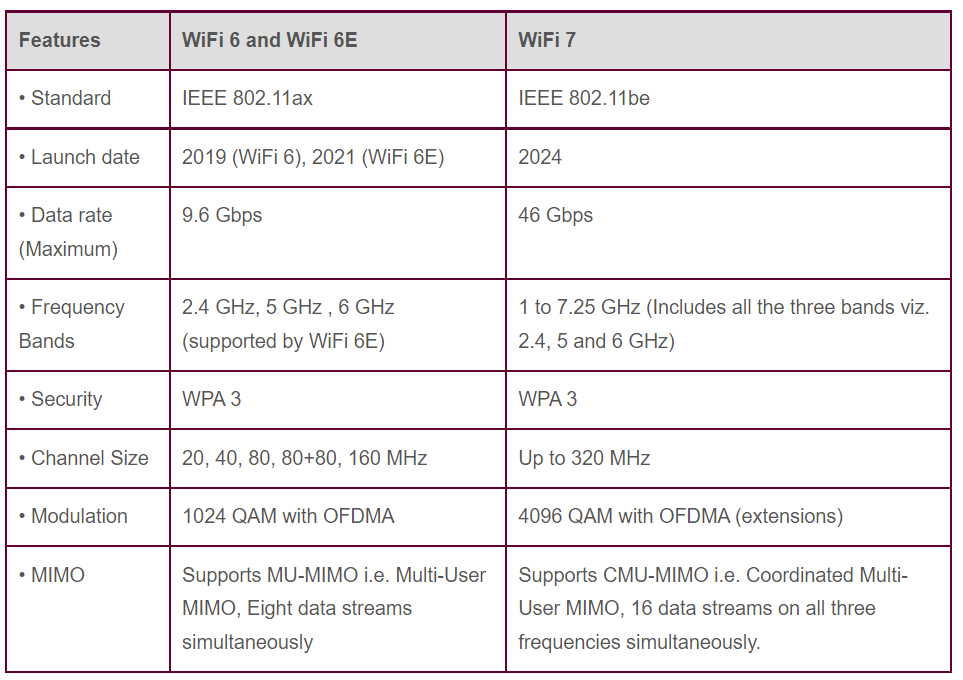
In this report, we introduce the latest technology: Wi-Fi 7. This new technology allows you to get internet download speeds double those of the current Wi-Fi 6 available in the market.


New Generation Of High Speed Internet (2024-2025)
Many well-known companies that manufacture electronic chips (Chipsets) have announced the development of a chip that works with the new Wi-Fi 7 technology, the latest and most advanced generation after Wi-Fi 6 and Wi-Fi 6E.
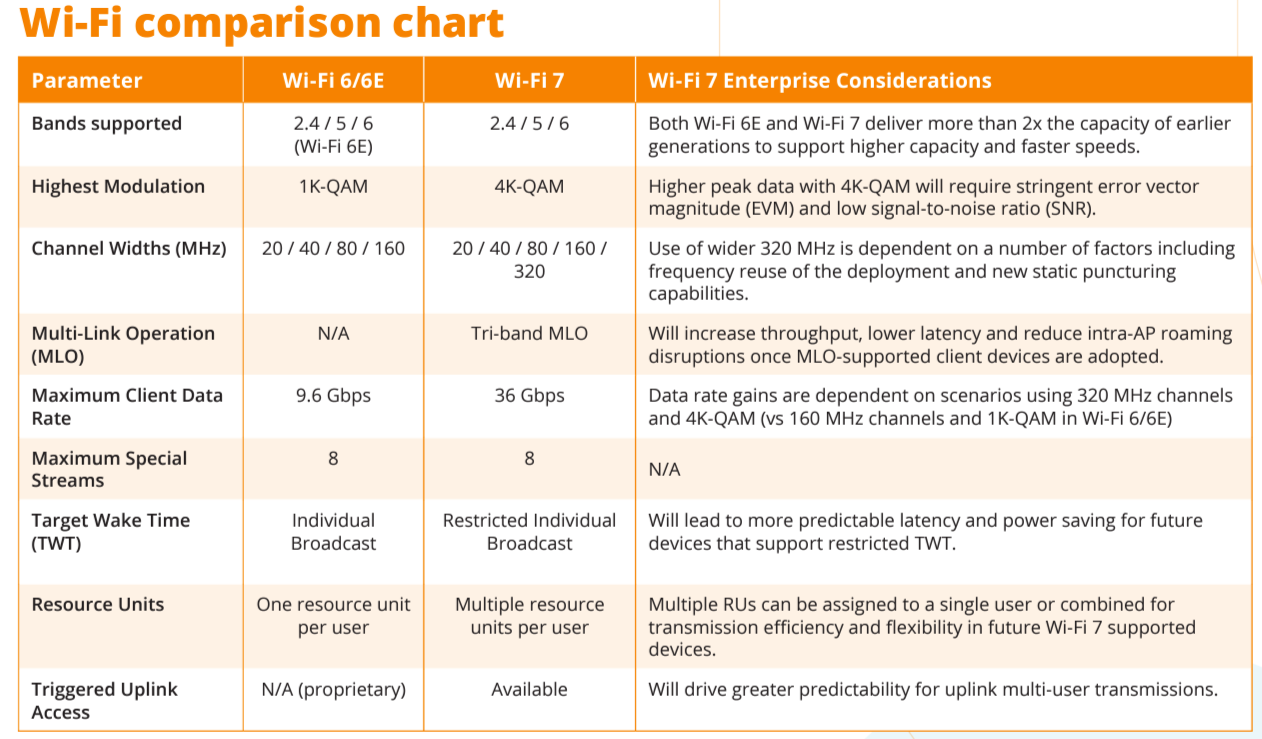
The new Wi-Fi 7 technology can achieve download speeds of up to 5000Mbps by using the 320MHz bandwidth available in the 6GHz spectrum, almost double the current speed of Wi-Fi 6, which uses 160MHz in the 5GHz spectrum.
The new high-speed Wi-Fi 7 technology will suit crowded areas with many users, such as restaurants, train stations, airports, and large shopping malls. It will also be suitable for 8K televisions, provided that the television supports Wi-Fi 7 technology.
Many customers wonder if Wi-Fi 7 technology is expected to be a real alternative to network cables and their extensions within walls. The answer is yes, but only if all the devices you use support Wi-Fi 7 technology and you comply with the infrastructure requirements for operating Wi-Fi 7 devices, such as the cables connected to the Access Points installed and the 2.5GB switches required to support this high-speed technology.
The Wi-Fi 7 Multi-Link Operation (MLO) feature:
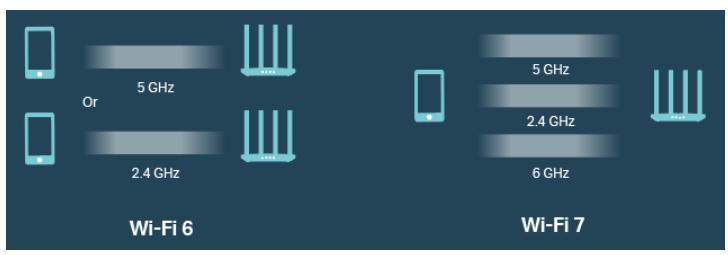
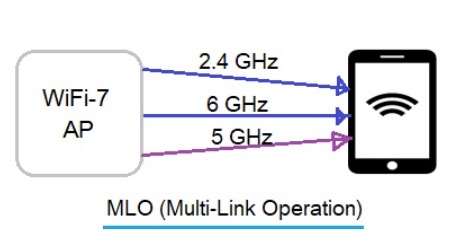
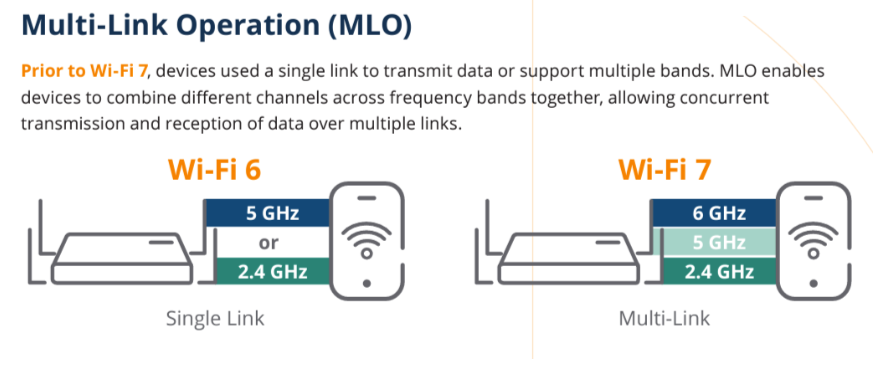
The Multi-Link Operation (MLO) feature in the new Wi-Fi 7 technology works by connecting your mobile phone or computer to all three networks available in the access point: 2.4GHz, 5.8GHz, and 6GHz. It combines the speeds of the three frequency bands, allowing you to transfer data at an extremely high speed that can reach up to:
What is the Required Infrastructure to Properly Run WiFi7 Speeds at Home or Office?
1- You need a router with RJ45 ports that support 2.5GB speed.
2- You need a switch with RJ45 ports that support 2.5GB speed, 10GB Uplink ports connected by fiber optic cable, and 10GB SFP between the switches.
3- You need a cable between the router and switch that is at least CAT7a Shielded and preferably CAT8 Shielded.
4- The entire internet network and access point (AP) should be wired with CAT7a Shielded cable.
5- If there is an AP Controller device, it must support 2.5GB ports.
6- Your mobile phone and personal laptop must support WiFi 7 technology – please verify this before purchase.
7- For home projects, providing a 3/4-inch pipe for each CAT7a cable is recommended, running directly to the central collection point and to only one access point in the ceiling. This is because CAT7a Shielded cable is thicker than regular cables.
What is the meaning of (Shielded twisted pair cable (STP)?
STP cables were initially designed by IBM to solve the problem of data transfer speed loss, which was around 30% due to electromagnetic interference generated from within the cable wires during data transmission and the twisting of the wires inside the cable.
The solution involved shielding each pair of wires with a metallic material (typically tin-plated copper) to prevent these waves from interfering with each other.
XonTel provides the latest technologies at competitive prices, competing with its global counterparts. It also has a highly professional and efficient support team that accurately understands and meets the needs of all its customers. XonTel is considered the best choice.
For more information, contact us now. Click here.
Frequently Asked Questions (FAQ)
What is Wi-Fi 7 technology?
Wi-Fi 7 is the latest generation of Wi-Fi networks, designed to offer higher speeds, lower latency, and better capacity for handling a large number of connected devices at once. It suits smart homes, offices, commercial complexes, and places that need to transfer large amounts of data.
What is the difference between Wi-Fi 7 and Wi-Fi 6?
Wi-Fi 7 offers wider frequency bands and channels, with improvements that help increase data transfer speed and reduce latency compared to Wi-Fi 6. Wi-Fi 7 also supports advanced technologies such as Multi-Link Operation, which allows compatible devices to use more than one frequency band to improve speed and connection stability.
Is Wi-Fi 7 faster than Wi-Fi 6?
Yes, Wi-Fi 7 can offer higher theoretical speeds than Wi-Fi 6, especially when using a 320 MHz-wide channel and the 6 GHz band. However, actual speed depends on the router or access point specifications, the device used, internet speed, coverage quality, and network infrastructure.
What infrastructure and cabling are needed to run Wi-Fi 7 speeds efficiently at home or in the office?
Getting the most out of Wi-Fi 7 technology requires strict infrastructure preparations, including:
- Routers and switches equipped with RJ45 ports supporting at least 2.5GB speed.
- Using CAT7a Shielded or CAT8 network cables to ensure no speed loss and to avoid electromagnetic interference.
- The devices used (phones and laptops) must already support Wi-Fi 7.
- Providing a 3/4-inch conduit pipe for each individual cable, given the thickness of shielded cables.
What is meant by the Multi-Link Operation feature in Wi-Fi 7?
The Multi-Link Operation (MLO) feature allows a compatible device to use more than one wireless band or link within the network, such as 2.4, 5, and 6 GHz. This helps improve connection speed, reduce latency, and increase network stability in cases of congestion or wireless interference.
Do I need a new access point to benefit from Wi-Fi 7 technology?
Yes, a router or access point that supports Wi-Fi 7 must be used to benefit from its new features. The connected phone, computer, or device must also be compatible with Wi-Fi 7, otherwise it will operate using an older standard such as Wi-Fi 6 or Wi-Fi 5.
What role does the access point play in a Wi-Fi 7 network?
The access point is the device responsible for providing wireless coverage and connecting phones, computers, and smart devices to the network. In Wi-Fi 7 networks, the access point must support the high speeds, the required frequency bands, and suitable network ports so that the wired connection doesn’t become a bottleneck for wireless performance.
What is meant by Shielded Twisted Pair (STP) cables, and why are they necessary?
These are cables designed with tin-based shielding around each pair of wires inside the cable, aimed at preventing electromagnetic interference caused by data transmission within the wires themselves, which can cause speed loss of up to 30%. These cables are therefore essential when running high-speed access point networks to ensure stable, clean performance.